.png)
Many product teams already use AI throughout the research workflow, whether it’s study planning or data synthesis. Yet in most cases, AI still acts as a passive thought partner that relies on context that you manually provide. It can respond to the information you type, upload, or paste into the conversation, but it has little awareness of the research that sits beyond that immediate context.
Model Context Protocol (MCP) changes that. By giving AI access to approved research systems and specific tools, AI can take on a more active role to assist your research. It can find relevant studies, retrieve source material, drive insights grounded in data, and carry out parts of the research flow.
Despite how technical the term sounds, using MCP does not involve writing code. It’s as simple as enabling a toggle within the LLM of your choice.
This article covers what MCP is, why it matters for UX research, and how product teams can use it effectively.

What is MCP?
Model Context Protocol, or MCP, is an open standard that allows AI applications to connect with external tools and data sources. Put simply, it gives AI a consistent way to understand what it can access and what it can do with that information.
Using an MCP server is a lot like ordering from a restaurant menu. The AI can see what is available, what each option does, and how to ask for it, all in plain language. It does not need to understand everything happening behind the scenes, but only needs to know what the user wants and which tool can help get there.
So when you ask, “What did P3 say at the 20-minute mark?”, the AI does not have to wander into the kitchen or guess what is there. MCP shows it the available options, such as get_transcript, and gives it a consistent way to request what it needs.
.png)
For the person using it, most of this happens in the background. You ask a question in plain language, and the AI chooses the right set of tools to retrieve the relevant information.
Clarifying the Terms: LLMs, APIs, and MCP
It is common for these terms to be conflated, but they play distinct roles in what’s actually happening in the back.
MCP and LLMs
A Large Language Model (LLM) is the reasoning engine that understands language and generates responses. On its own, it generally works from its training and whatever context is included in the conversation.
MCP does not replace the LLM or make it inherently smarter. It gives the AI application a way to bring in external context and use tools when needed.
MCP Client vs. API
An API is a way for software systems to communicate and talk to one another. It provides the “plumbing” to move information. A research platform may already use APIs to return studies, transcripts, or notes.
MCP often sits on top of those existing APIs. The difference is that it presents those capabilities in a standard, AI-friendly format so the model can discover the available tools and decide which one to use. The API still does the underlying work, while MCP provides a common way for AI applications to find and call it.
MCP Servers vs. Connectors
MCP is the shared protocol. A connector is the specific integration that links an AI application to a particular platform using that protocol.
For example, a research platform might provide an MCP server, while an AI assistant offers a connector that lets you authenticate and use it. In everyday product language, people may use “MCP” and “connector” interchangeably.
In a more technical sense, an AI agent within an AI workflow can use an MCP host to interpret a user query, coordinate multiple tools, and complete a more complex workflow through a native MCP server.

Why MCP Matters for UX Research
Current Challenges
User research itself is a full-time job, and researchers are often juggling multiple studies, stakeholder requests, recruitment, analysis, and reporting at once. Many core steps still require manual review and careful judgment.
Another challenge is making research insights accessible when making key design decisions since research data is often dispersed and siloed. Evidence lives across project directories, session recordings, transcripts, and repositories. So even when a research has been conducted, someone still has to recall it, review it, and bring the relevant parts into the conversation.
AI-Powered Workflow with LLMs and MCP
LLMs have made some of this easier, but the workflow still involves manually finding files, copying content, and explaining the context each time because at the end of the day, you get what you feed into it. The model only sees the slice of research that’s being provided.
MCP vastly improves this workflow by accessing your research stack. Instead of understanding only what is pasted into a chat, it works with broader context from connected research systems: The study you are running, earlier projects, customer profiles, learning goals, and related findings across the company.
This changes the kinds of questions teams can ask. Instead of simply summarizing a single transcript, AI lets you cross-reference multiple projects, explore how a new finding fits into past research, and whether a new pattern is emerging or not, all by chatting with AI in real time.
Artificial intelligence with MCP creates a few practical gains:
Core Capabilities of MCP
We’ve talked a lot about AI gaining access to your research stack, but what does that actually mean and how safe is it?
This section breaks down the essential AI capabilities at a high level, in plain language. While many individual tools now offer their own MCP connections, they do not all work the same way. What an AI can access, retrieve, or change depends on the tools the platform makes available and the permissions set by you or your organization.
At a high level, those capabilities tend to fall into a few areas.
Reading workspace data
This is probably the most fundamental capability. Read access allows AI to retrieve information from your research platform without changing anything.
In practice, it means the AI can read the research already stored in your workspace, so you do not have to reintroduce the same context every time you start a new conversation. Depending on the platform, that may include:
- Workspace projects
- Study details, such as research plans, learning goals, and research questions
- Participant and customer profiles
- Raw research data, including CSV files, recordings, and interview transcripts
- Analysis outputs, such as notes, tags, themes, and reports
This gives the AI more than a single file or chat thread to work from. It can understand how the research is structured, including which study, participant, session, or question a piece of evidence came from.
Searching and connecting evidence
MCP tools can help AI move across your research instead of treating each file or study as a separate item. It may be able to find related projects, pull evidence around a topic, compare customer groups, or connect a new finding with earlier work.
This is where MCP becomes more than a way to open files. The AI can work across the relationships within your research between studies, participants, questions, notes, and findings rather than simply reading a folder of documents.
Creating and updating research artifacts
Some MCP connections also provide write access. With the right tools and permissions, AI may be able to:
- Create or edit notes
- Apply labels or tags
- Add evidence to a theme
- Draft study materials, such as research plans or interview guides
- Update summaries or reports
- Create and publish studies
Write access can take repetitive work off the researcher’s plate, but it also comes with more risk. Anything the AI creates or changes may become part of the research record, so research teams need clear review and approval steps.
Working within permissions
MCP does not give an AI model unrestricted access to an entire platform. Instead, access control is enforced by the provider, which defines the available data, actions, and several tools based on the permissions assigned to each user or organization.
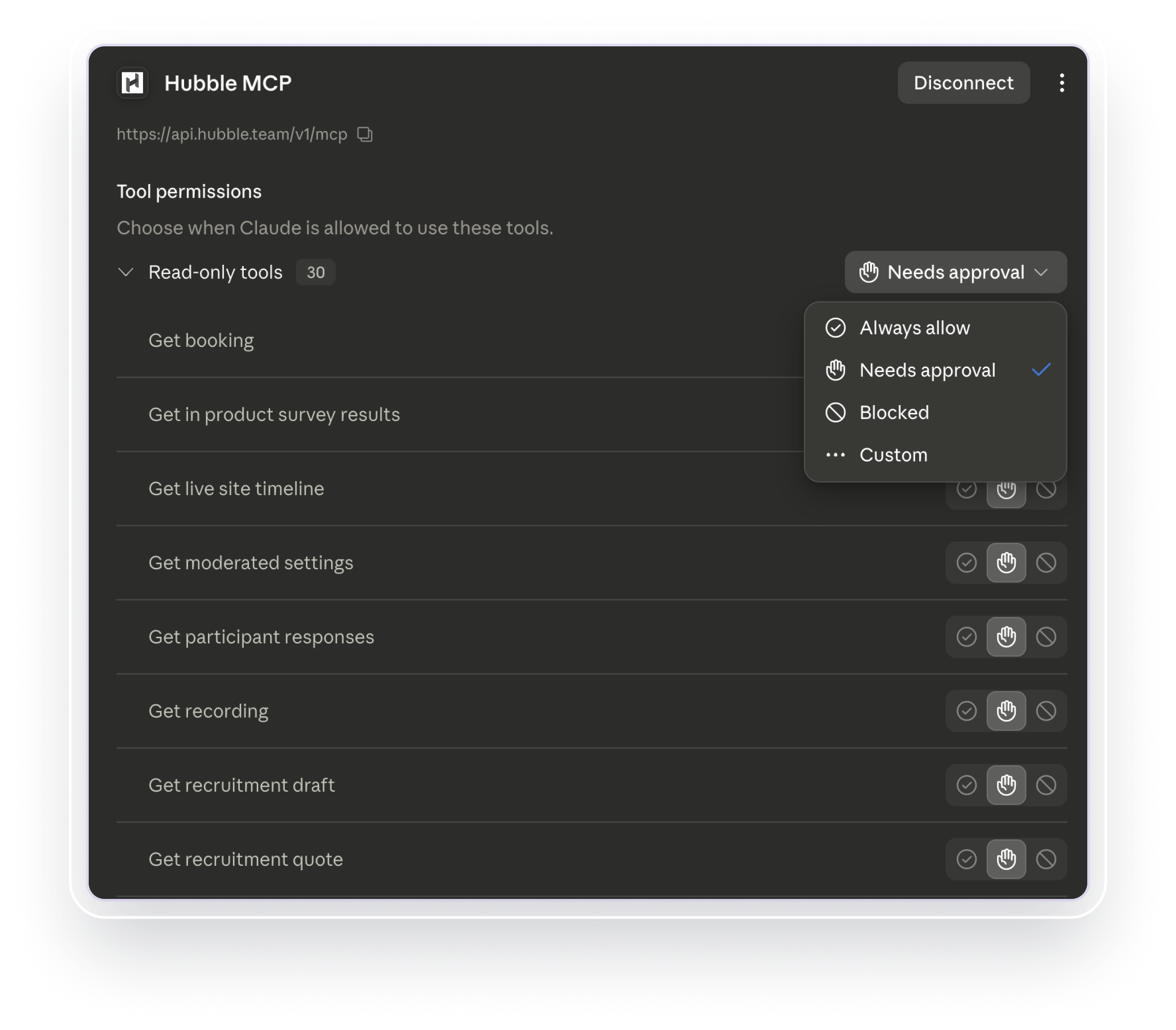
That distinction matters. A connection may be read-only, allow a narrow set of changes, or require confirmation before an action is completed. Teams should understand those boundaries before using MCP in sensitive research workflows.
Practical Use Cases of MCP with Examples
The examples below come from how we’ve used MCP in our own research and in work with clients. They show where it can be genuinely useful across the research process, not just in theory, but in day-to-day practice.
1. Cross-study synthesis and reference
When AI has access to the broader research workspace, it can look across multiple projects instead of treating each study as a separate piece of work. This is especially useful across iterative research, such as moving from foundational interviews to a prototype test or multiple rounds of usability studies.
For example, you might run a few additional unmoderated sessions to further investigate topic areas that came up in interviews, and have AI combine the two and treat them as one for data analysis.
You can leverage AI to:
- Flexibly merge or separate research work
- Connect new emerging findings or patterns to past research
- Uncover or recall previous findings during study planning
- Triangulate qualitative and quantitative research work as a single project
This means AI can reference your research repository and respond with the broader research context in mind whether it's research planning or data analysis.
2. Data cleaning and preprocessing
Data cleaning is one of the most manual parts of research, and it is easy to overlook how much AI can help. Whether the data is qualitative or quantitative, you still need to review responses, flag low-quality entries, resolve formatting issues, and decide what should be included in the analysis.
With MCP, AI may be able to access real time data or the full dataset directly from the platform, along with the study plan and research context. That means it can help identify incomplete responses, suspicious patterns, conflicting answers, or formatting problems without requiring you to download and upload the same files each time.
Even without write access, the AI can work from a copy or snapshot of the data. You can ask it to suggest exclusions, restructure columns, standardize formatting, or prepare a cleaned version for export.
Human review is still essential, especially when deciding whether a response should be removed. Regardless, AI takes care of much of the initial scanning and organization, saving you a significant amount of time.
3. Synthesizing themes and retrieving evidence
During analysis, AI can help review transcripts, recordings, notes, and survey responses to uncover recurring themes, behaviors, and points of friction across participants.
But frequency alone does not always make something important. A less common observation may still matter if it reveals a serious usability issue, or affects a high-priority customer group. It is useful to ask AI not only what came up most often, but also where participants disagreed, what felt unexpected, and which findings may have the greatest impact.
Any theme should also be tied back to evidence. Ask the AI to support its conclusions with participant quotes, transcript references, response counts, or quantitative results where available. This makes the synthesis easier to verify and helps separate what participants actually said from the AI’s interpretation.
AI can speed up the first pass, but the researcher still needs to review how themes were grouped, whether important context was lost, and whether the findings answer the original design questions.
4. Generating research artifacts
Artifact generation is largely an LLM capability, but MCP makes the workflow much smoother by giving the AI direct access to the underlying research data and context.
For quantitative work, you can ask AI to recommend an appropriate visualization, run a significance test, and incorporate the results into a chart. You can then refine the labels, grouping, or presentation through conversation. This can save a great deal of time compared with moving data between tools or writing separate scripts for each graph.
Let's create a gap / lollipop chart on Q7 of the survey. Put any label, legend info below the actual graph. Make sure the text labels don't overlap. Add an indicator for any statistical difference.
Done.
research_source_lollipop_sig.png

AI can also create a first pass of reports, presentations, and other research deliverables. Because it can work from the study plan, findings, quotes, and supporting data, the output can begin with more context than a generic slide template or summary.
The first draft still needs a researcher’s judgment. A technically correct chart may emphasize the wrong comparison, and a polished report may still miss the real story. Yet starting with a usable structure and visual layout lets you spend more time sharpening the narrative, checking the evidence, and deciding what the audience actually needs to understand.
5. Making research more accessible to the team
When team members have view access to the research workspace, they may also be able to connect their AI tool to the same research platform.
That means product managers, UX designers, and other stakeholders do not always have to rely on a researcher to find relevant findings or quotes. They can explore the research directly by asking questions in plain language, which can make existing evidence easier to discover and bring more people into the research conversation.
But easier access does not automatically lead to better interpretation. Stakeholders may still ask leading questions or search only for evidence that supports a direction they already prefer. AI should help teams explore the research more broadly, and not simply validate a decision that has already been made.
Best Practices for MCP in Research
MCP can make research workflows faster and more connected, but the quality of the output still depends on how the system is used. A few habits make a meaningful difference.
Clean and explain the data first
Before asking AI to analyze the data or synthesize recurring themes, make sure the dataset is clean and ready to use. Remove obvious errors, flag low-quality responses, and confirm that the structure matches how the study was actually run.
If the study includes unusual logic, changes between rounds, skipped questions, or formatting that is not obvious from the CSV or table alone, explain that context or reflect it clearly in the file. AI can only interpret the data well if it understands what each field represents and how the dataset was collected.
Ask questions for clarifications
Before jumping into research planning or analysis, check that the AI has the context it needs. Even with access to your research workspace, it may still be missing details such as recent decisions, business constraints, or what you are trying to accomplish.
Add any relevant background, then ask the AI to clarify assumptions or surface missing information before it proceeds. This small step can prevent it from heading in the wrong direction based on an incomplete understanding of the task.
Iterate, iterate, and iterate
Working with an MCP-enabled LLM should still be a conversation. A single conversation and answer should not be taken at face value. Ask follow-up questions, challenge the framing, and push the AI to make the output more specific to the study, audience, and decision at hand.
Even with access to the research context, AI systems may fall back on broad summaries or regurgitate what it has already said. Iteration helps move the output beyond a surface-level recap and toward something more relevant, useful, and grounded in the actual research.
Keep qualitative findings tied to the source
When using AI to interpret qualitative data, always ask it to show the evidence behind its conclusions. That may include participant quotes, transcript timestamps, session references, study names, or links to the original source.
Then verify that the evidence actually supports the point being made. A quote can be accurate and still be misleading when taken out of context. For example, a participant saying “it was good” may have been referring to one specific part of the experience, while the AI connects it to a broader finding. Review the surrounding conversation before treating any quote as evidence.
AI may also combine direct participant feedback with its own summary or inference, and making that distinction clear is important:
- What participants directly said or did
- Patterns observed across the data
- The AI’s interpretation of what those patterns may mean
Keeping those layers distinct makes the output easier to evaluate. It also reduces the chance that an AI-generated interpretation is presented as if it were something participants directly expressed.
Avoid confirmation bias
Avoid using AI to confirm or validate a direction the team already prefers. The way you frame a question still shapes the answer, even when the AI has access to the underlying research.
Instead of asking, “What did participants like about Feature X?”, ask something more neutral, such as, “how did participants feel about Feature X?” Then ask for both supporting and conflicting evidence, and if applicable, differences across participant groups. This additional layer reduces the risk of using AI to blindly search for evidence that supports the team’s preferred decision.
AI can still hallucinate, miss context, or produce biased interpretations. It is still up to you to verify the evidence, challenge the output, and mold it into the right narrative.
Model Context Protocol (MCP) in UX Research
MCP gives AI a more active role in research. Instead of working only from what you paste or upload into a chat, it can connect to approved research systems, retrieve the right context, and help across tasks like finding studies, comparing evidence, analyzing data, and drafting research outputs.
That does not remove the need for researcher judgment. The value comes from combining better access and automation with deliberate review, back and forth conversations, and researcher input that are tied to its source.
For more MCP-related resources:
- Understanding How MCP works in depth
- Introducing Hubble MCP
FAQs


Not at all. While building or configuring an MCP server may require technical work, many platforms provide ready-made connections. For most product team members, using MCP may be as simple as connecting an approved research platform to an AI tool.
It depends on the platform, connection, and permissions in place. MCP does not automatically give AI access to everything. Teams should review what data and tools are exposed, whether the connection is read-only or includes write access, and how sensitive data, such as participant data, is handled before using it with sensitive research.
No. Uploading a file gives the LLM a limited snapshot of the information you provide in that conversation. MCP allows the AI to retrieve information from connected research systems as needed.
No. MCP can reduce manual work around finding, organizing, comparing, and summarizing evidence, but it does not replace research judgment. Researchers are still responsible for evaluating study quality, interpreting context, identifying limitations, and deciding what the findings mean for the product.


.png)