.png)
Most MCP connections for research tools are built to read. The agent searches your repository, pulls transcripts, and summarizes what your team already found. Then it hands you that summary at the exact point where the work starts, and you go open the study builder and start typing.
Our earlier post on planning covered that reading half, querying your workspace for past studies, transcripts, themes, and findings before you write a single objective. Our webinar recap looked at the whole agentic workflow end to end, from planning through analysis. This article goes deeper into two steps in the middle of that workflow: creating the study and setting up recruitment.

What MCP can change in your workspace
Model Context Protocol is an open standard that connects AI tools to external services in real time. It is supported across the major AI platforms, including Claude, Claude Code, Claude Desktop, ChatGPT, and Cursor, which means the same research tools become available wherever your team already works. Our MCP explainer covers how the protocol itself works.
Read tools and write tools
MCP connections differ in what they let an agent do. A read-only connection can tell you what your team learned from previous prototype tests. A connection with write access takes that answer and builds the next study from it, which is the difference between a repository you consult and one you work from.
Hubble's MCP server does both. These are the tools that write:
There are more beyond this list, including tools for study status, themes and evidence, recording notes, labels, folders, and saved reports. What matters for this article is that reading your repository and building the next study happen in the same conversation.
How permissions work
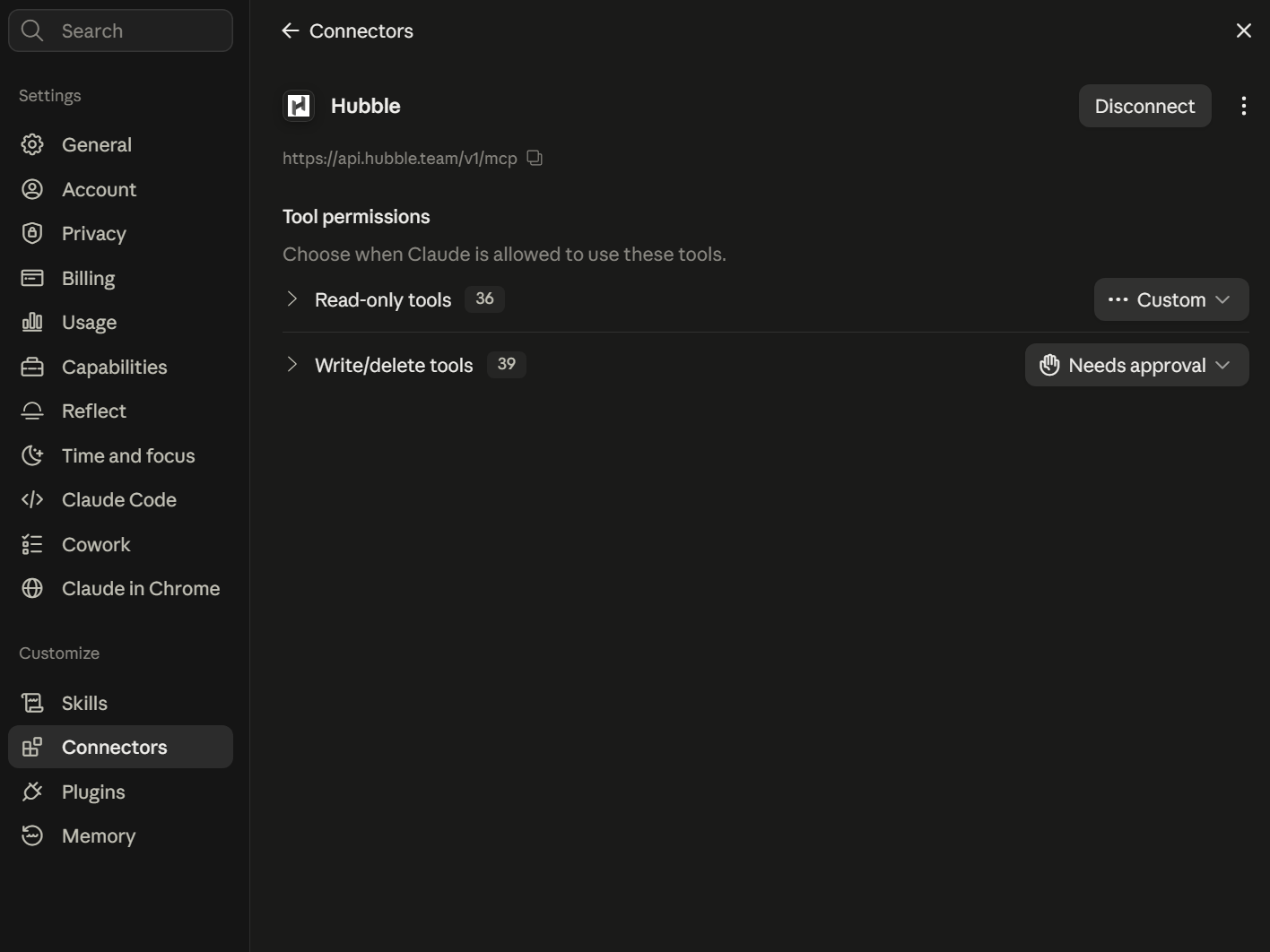
Because write access changes records in your workspace, AI clients treat these tools differently from read-only ones. In Claude, as of August 2026, Hubble's read and write tools appear as separate permission groups, with the write group set by default to ask for approval before it runs. Those settings are yours to adjust, and it is worth checking them when you connect.
The connection also inherits your own access rather than creating a broader one. An agent operating under your account can reach what you can reach and nothing further, and enterprise workspaces add audit logging and SSO on top of a SOC 2 Type II, HIPAA, and GDPR compliant foundation. Customer data is not used to train third party AI models. Our governance post covers what a security review will ask about all of this.
Creating a study from a research gap
Research plans start with a question about what the team already knows, and the read tools answer that part. The planning post covers how to run that check.
The example here came out of one such gap. A checkout brief listed five questions. Three already had studies scoped against them: cart-to-payment drop-off, pricing tier comprehension, and mobile payment sheet discoverability. Two had nothing pointed at them, including what people do after a payment gets declined.
That gap is already in the conversation, so building a study around it is the next message rather than a new tab.
What the agent drafts
One message, three tools. The study gets created, the plan gets written into it, and the tasks get added. Keeping the plan attached to the study rather than in a separate document pays off months later, when someone opens it and wants to know why it asked these particular questions.
Read the reply for the decisions it explains. A real payment decline cannot be staged reliably in an unmoderated test, so both tasks come back as recall questions rather than a live checkout walkthrough. The reply also flags what it left alone: the device setting, the absence of a screener, recruitment. Which decisions are still open is usually more useful than the confirmation itself.
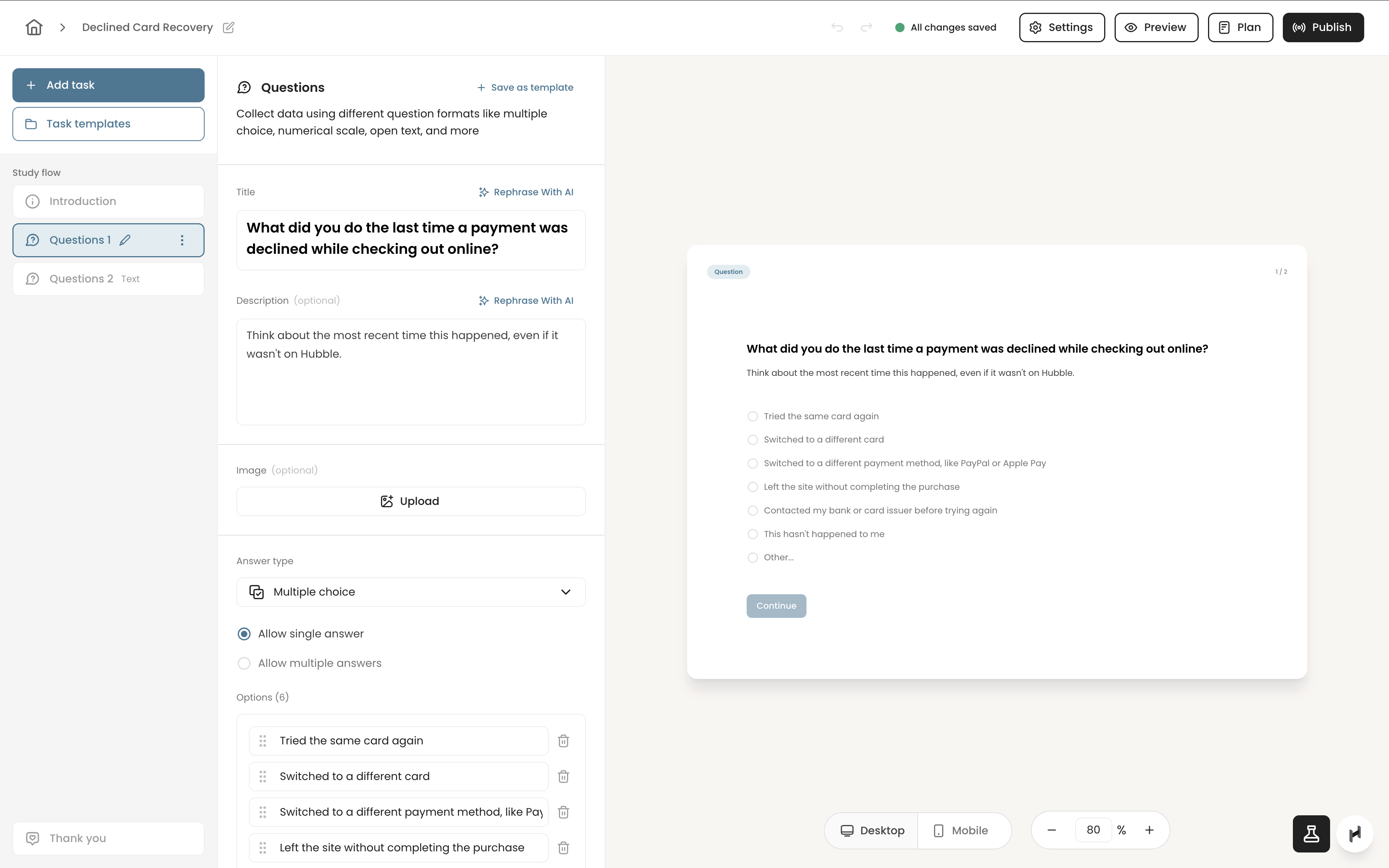
The single-select task shows what "draft two tasks" produced. The request named three behaviors: retry, switch, or give up. The task came back with seven options. One covers contacting the bank before trying again, a common behavior nobody thought to mention. Another lets participants say the situation has never happened to them, which keeps the open-text answers from being filled in by people with nothing to recall. The description asks them to think of any recent decline rather than one on your product, which separates a usable recall question from a leading one.
Read the wording before the study reaches participants. A question can look right in the builder and still be wrong for the decision you are informing. What you are editing, though, is a considered draft rather than a template with your keywords inserted.
What a study can hold
A study is created as either unmoderated or moderated, and that choice happens up front. Everything inside it is a task, and an unmoderated study can hold question tasks, prototype tests, live site tasks, card sorting, tree tests, and AI moderated interviews. One request can produce a mixed flow rather than a single question type.
The study then stays in draft until you publish it, which is a separate step on purpose. Building a study and deciding it is ready to run are different judgments.
Setting up recruitment
Recruitment in Hubble is a separate object from the study. A recruitment form gets created and attached to the study, then filled in with the audience, the participant-facing copy, and the screener questions with their qualify and disqualify branches.
The request named an audience and one screener question. What came back also included a public listing title and description that participants see before they apply, and instructions for what qualified participants should do before the session begins.
That listing copy is the part most teams underestimate. It has to make sense to someone browsing a panel with no context about your product, and it comes back written for the participant rather than for the researcher.
Panel providers work in their own vocabulary, with age in brackets and project topics drawn from a set taxonomy. The agent maps your phrasing onto those values and reports which ones it selected, so looking up valid options turns into reviewing a decision that is already made.
Moderated sessions
Moderated research adds scheduling on top of targeting, and the same connection reaches it. Session length, availability windows, and the calendar behind a study are all configurable through the conversation, and existing bookings can be listed, rescheduled, or cancelled the same way. A connected calendar has to be in place before a moderated study can take bookings.
Two layers of participant targeting
Participant targeting runs on two layers, and knowing which one to reach for saves the most time.
Panel attributes
The first layer is panel attributes. Consumer studies can filter on country, age, gender, education, and household income. B2B studies add industry, job title, skills, and company size, drawn from a panel of 6M+ participants across 150 countries. Moving between them is a matter of describing who you need. The same study can shift from a consumer audience to a professional one, with job title and industry filters set from a plain description, while the study design underneath stays as it was.
Screener questions
The second layer is the screener, and this is where a conversational interface earns its place. Panel attributes describe who someone is. Screener questions describe what they have done, which is usually closer to what a study needs. The declined-card question above is not a demographic filter. It is a behavioral one, and it defines that sample more than the age brackets do.
Personality and psychographic targeting belongs to this second layer as well, and it is worth being precise about because it is often described loosely. Panel attributes are demographic and professional rather than psychometric, so traits like risk tolerance or brand loyalty are captured through screener questions rather than selected from a filter. That turns out to be the more useful path anyway, since a behavioral question can be written for your specific study. You describe the person you are trying to reach in a sentence, and the model turns that into qualifying logic with the reject branches already configured.
Sample size raises the stakes on this. With three participants, a slightly loose qualify branch has limited effect. With thirty, it determines who a third of your sessions are, and that usually becomes apparent during analysis rather than before.
The screener is written in the same conversation as the study, so the two stay connected. The tasks you just drafted and the criteria deciding who sees them come out of one description of what you are trying to learn, instead of being assembled separately and reconciled later.
What requires your approval
Nothing described above has gone live or cost anything. The study remains in draft until you publish it, and the recruitment form remains unpublished until you publish that too.
The second of those is deliberately difficult to trigger by accident. Publishing recruitment cannot be undone, only paused or closed, and credits commit as participants complete their sessions. So the publish tool is defined to require a confirmation that is only set once you have seen a quote and approved it, which puts the cost in front of you before anything goes out. Cancelling works up until the point the publish sequence begins on the panel provider's side, after which it runs to completion rather than leaving a partial project behind.
So the reply comes back with the draft complete, the quote attached, and the recruitment still unpublished. Nothing in the request had said to wait.
After it goes live
Once recruitment is live, the same conversation follows it. You can ask where the funnel stands, see who applied and how they answered the screener, and pause, resume, or close an active form. Approving a participant runs on a separate tool, so viewing your applicants and accepting them are two different permissions rather than one action.
Best practices for building studies with MCP
Write access removes the typing involved in setting up a study. It does not remove the judgment, and a few habits keep the output useful.
Read the decisions, not only the confirmations. The most useful part of these replies is the explanation of a choice: why recall-based tasks, what was left at its default, what was added that you did not ask for. Each of those is a research decision, and each is easy to change while the study is still a draft.
Connect every question to something. Ask the model to justify each research question against a gap in what your team knows or a decision a stakeholder is waiting on. If it cannot, the question probably does not belong in the study. The planning post makes the same point, and it applies more once studies are built automatically, because a weak question costs participant time rather than sitting unused in a document.
Read the screener as an exclusion list. A screener that disqualifies too aggressively produces a clean sample of the wrong people, and that usually goes unnoticed until analysis, when the data already looks orderly. Before publishing, read each disqualify branch and consider who it removes.
Keep launch a human decision. Let the model draft the plan, build the study, and prepare recruitment. You review the tasks, approve the participant criteria, and decide when it is ready. The two publish steps are the natural checkpoints, and they are worth stopping at rather than approving on the way past.
Try it on a study you were already going to build
Study setup moves into the conversation where you are already thinking about the research. A gap in your repository becomes a study with tasks, options, and participant-facing copy. A description of who you need becomes a targeted, screened recruitment form. Much of what comes back was never specified, and all of it is there to review before anything goes live.
What stays with you is the part that needed you anyway. Whether the questions are right, whether the sample will answer them, and whether the study is worth participant time at all. Product teams want research to inform design decisions on a shorter cycle, and cutting the setup work is one of the few ways to do that without cutting the rigor.
From there the workflow continues into data collection and analysis, which our webinar recap walks through.
Everything described here is current as of August 2026, and this part of the tooling moves quickly. The most useful test is your own. Connect a workspace, describe a study you were going to build anyway, and see what comes back before you write a single task by hand.
Additional Resources
- To learn more about MCPs, check out MCP for UX Research: What it is and Why it Matters.
- To see how to plan research from your existing repository, check out How to Build User Research Plans with Hubble's MCP.
- For prompt patterns across every stage of the workflow, check out MCP for UX Research: How to Prompt AI Agents Across the Workflow.
- For how agent access to research data is governed, check out MCP Governance for UX Research.
- To see the full agentic workflow from planning through analysis, check out How to Run End-to-End User Research with AI Agents.
FAQs


Write tools appear as a separate permission group in AI clients like Claude, and by default that group asks for approval before running. Those permission settings are yours to configure. A study created this way also stays in draft until you publish it, so nothing reaches participants without a deliberate step from you.
Consumer studies can target on country, age, gender, education, and household income. B2B studies add industry, job title, skills, and company size. Anything the panel does not cover as a native attribute, including attitudinal and behavioral criteria, can be captured as a custom screener question with qualify and disqualify logic.
No. The publish tool is defined so that its confirmation is set only after a cost quote has been presented and accepted. The agent can prepare a complete, publishable recruitment draft, but the draft stays unpublished until you approve the spend.
Not to get a first draft. Describing who you need in plain language produces screener questions with their reject branches already configured. Reviewing them before publishing is still worthwhile, particularly the disqualify branches, since those determine who never reaches your study.