.png)
Over the past year, MCP has gone from a protocol most researchers had never heard of to a line item on enterprise security reviews. The Model Context Protocol, an open standard originally developed by Anthropic, lets AI assistants like Claude and ChatGPT connect directly to the tools where your research lives. Instead of exporting transcripts and pasting them into a chat window, the AI queries your studies, reads your notes, and in the more capable implementations, creates new research without you ever leaving the conversation.
That last part is where the tools start to separate. Most UX research platforms with an MCP server today offer read access, so you can ask an AI what participants said about checkout friction and get an answer grounded in your actual data. The stronger ones also support write actions, letting the AI create studies, draft screeners, or log notes back into the platform. And several of the servers on this list are still in beta or gated behind early-access programs, which the feature pages don't always make obvious.
Hubble sits on the shipped side of that line, a UX research platform whose MCP server covers both directions, reading research data out and creating studies and notes back in. Below are thirteen UX research tools with official MCP servers, compared against a consistent rubric, so research, design, and product teams evaluating these integrations can see what each one actually does before committing. We examined 13 tools that support dedicated UX research workflows and ship a first-party server. The list starts with the platforms that run research, then moves to the research repositories.
Overview: MCP support across UX research tools
✅ supported · 🟡 partial or unconfirmed · ❌ not supported or not found as of publication
What the rubric measures
Every tool on this list has some form of official MCP support, so the checkmarks focus on what separates them:
- First-party MCP. Built and maintained by the vendor, not a community wrapper or Zapier middleware. Where the vendor's own label is beta or early access, the cell says so.
- Read & write. The AI can create or update things in the platform (studies, notes, insights), not just read from it.
- AI interview data. The MCP reaches interview data from AI-moderated sessions the platform itself runs.
- Full research platform. The MCP connects to a platform that runs studies (usability tests, interviews, surveys), not only a repository or a single method.
- Claude + ChatGPT. Both major AI assistants are supported.
1. Hubble
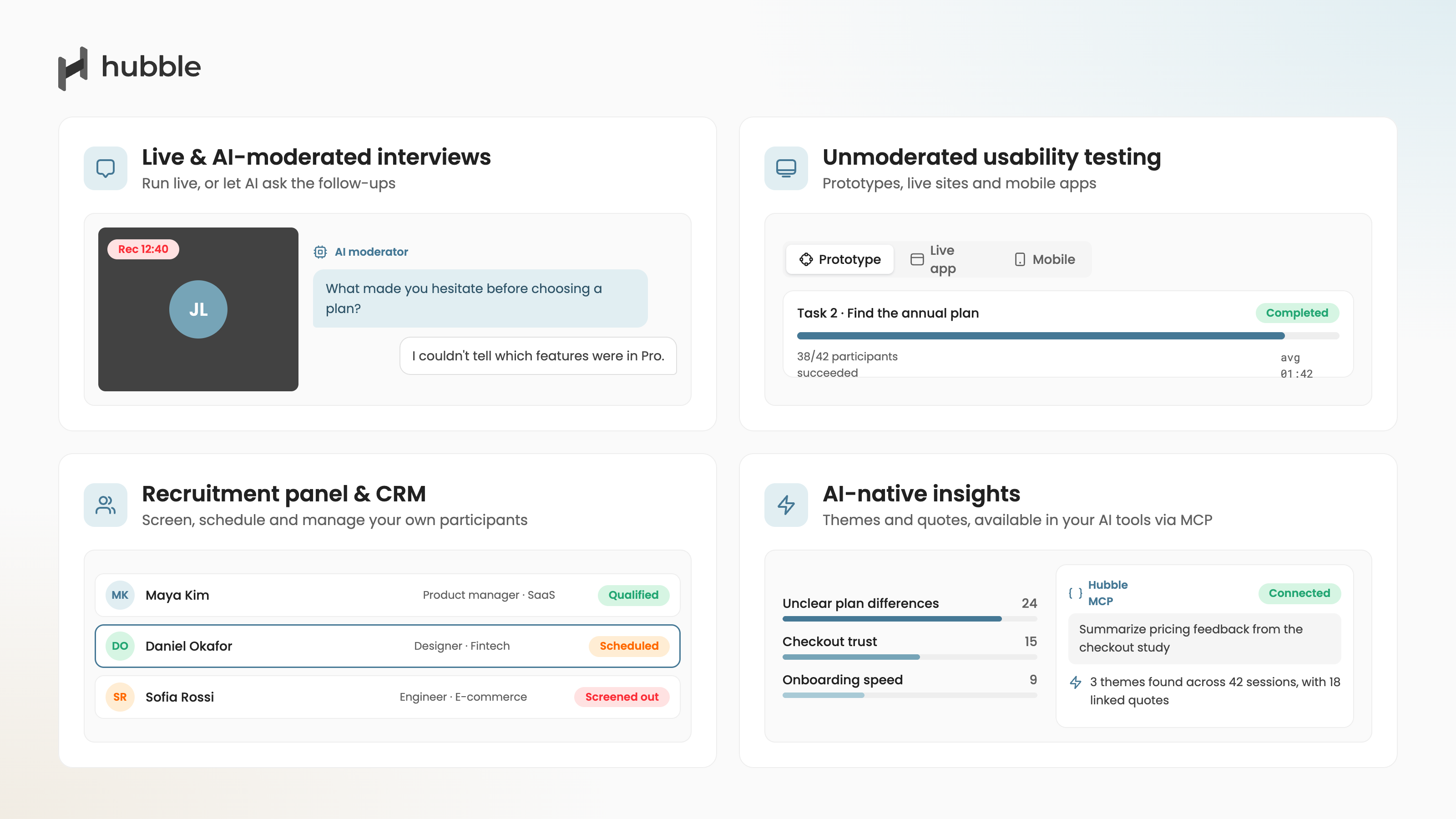
Hubble is a unified user research platform where AI Moderated Interviews, prototype tests, unmoderated usability tests, card sorting, tree testing, and in-product surveys all run in one place, and its MCP server connects that platform to Claude and ChatGPT. The integration works in both directions: the assistant reads research out of the platform and builds new research back into it.
The write side is the bigger shift. You describe a research goal in Claude or ChatGPT and a study takes shape inside Hubble, drafted against your existing study plan rather than from a blank template, so what comes out matches how your team already frames its research. A conversation that starts with "what did we learn last quarter" can end with the follow-up study sitting in Hubble, ready for review.
The read side benefits from how Hubble prepares its data. The platform auto-generates notes from custom, moderated, and prototype recordings, and every note the assistant retrieves carries its transcript quote, so asking Claude what recent usability tests said about the dashboard redesign returns an answer grounded in what participants actually said, not a summary of a summary. The assistant can create and update those notes as well, with writes following the same access rules as Hubble's REST API, so the MCP has no access beyond what the account itself allows.
The connection is managed from an MCP integration card in Settings, with setup guides for Claude and ChatGPT in the help center and multi-team support built in. The platform carries SOC 2 Type II certification and HIPAA and GDPR compliance, and Hubble offers a free plan alongside custom pricing for enterprises.
📌 Key Features & Highlights
- Create studies and study plans directly from Claude or ChatGPT
- Read and write recording notes, each carrying its transcript quote
- One integration across AI Moderated Interviews, prototype tests, and surveys
- Same permission rules as the REST API, with multi-team support
- Managed from an MCP integration card in Settings
📝 Summary
Plenty of these servers can read research, and a growing number can write it. What Hubble combines is harder to find: the full loop, from drafting a study to logging notes back onto recordings, on a platform where AI interviews, prototype tests, and surveys sit behind one integration, with nothing gated behind an early-access program. For teams that want that combination, Hubble is a strong place to start.

2. Great Question
Great Question is an all-in-one research platform spanning recruitment, interviews, surveys, prototype testing, and a repository, and its MCP is the broadest here, advertising over a hundred actions across the research workflow. Beyond searching the repository, it can create screeners, create and schedule interview and survey studies, recruit participants, and update study status. The default is read access for everyone, with admins deciding who gets write permissions. Claude, ChatGPT, and Cursor are supported, and the platform's existing permissions, PII controls, and workspace separation carry over to MCP access.
The MCP is offered to enterprise customers in early access and upon request, so what a given team can actually use this quarter depends on their plan and a conversation with the vendor. Its AI Moderated Interviews feature is separately still in beta, so how much AI-interview data the MCP reaches in practice is worth confirming up front.
📌 Key Features & Highlights
- Over a hundred advertised actions across candidates, study design, recruitment, and synthesis
- Write actions for screeners, studies, scheduling, and recruitment, gated by admin-granted permissions
- Read access as the default for the wider team
- Claude, ChatGPT, and Cursor support
📝 Summary
Great Question has built the widest MCP in the category on paper, and its permission model is sensible: read by default, write by admin grant. The whole integration sits in enterprise early access, though, so teams planning around it should confirm access and scope before the contract, not after.
3. UserTesting
UserTesting's MCP server, currently in limited early access, focuses on the front half of the research process. From Claude, ChatGPT, Figma Make, or other MCP clients, teams can recruit participants, create studies, and launch tests, with recruiting powered through UserTesting's own network and User Interviews. The company emphasizes enterprise-grade security practices with workspace-level controls, and states that customer data is not used to train third-party AI models, which matters for the security reviews these integrations increasingly trigger.
That early-access label means the MCP isn't something every customer can turn on today, and the scope at general availability may differ from the current program. For teams comparing vendors, UserZoom customers are covered here too, since UserZoom is part of UserTesting and has no separate MCP.
📌 Key Features & Highlights
- Recruit participants, create studies, and launch tests from AI assistants
- Claude, ChatGPT, and Figma Make support
- Recruiting through UserTesting's network and User Interviews
- Customer data excluded from third-party model training
📝 Summary
UserTesting brings real write actions to a platform that runs studies, and launching a test from inside Claude is a different workflow altogether than querying a repository. Until the MCP leaves limited early access, though, most teams are evaluating a roadmap rather than a feature.
4. Maze
Maze's MCP server, labeled beta on its own site, connects Maze research to AI tools like Claude, ChatGPT, and Cursor, letting team members ask about studies, transcripts, and session data without opening Maze or exporting anything. Because it follows the open standard, any MCP-compatible client can connect even without an official setup guide, and for teams already running prototype tests and usability studies in Maze, it turns that accumulated data into something an AI can work with directly.
The current implementation is read-oriented. You can ask about research that exists, but creating or launching studies through the MCP isn't part of what's described. Transcripts are queryable, and since Maze's AI Moderator produces transcripts, that data likely flows through, though Maze's public materials don't spell out AI Moderator session coverage specifically. The beta label means scope may still shift, and Maze doesn't publish which plans include the MCP, so anyone buying partly for it should verify both against their use case.
📌 Key Features & Highlights
- Ask about studies, transcripts, and session data from AI assistants
- Claude, ChatGPT, and Cursor setup guides, plus any standard MCP client
- Sits on top of Maze's prototype testing, surveys, interviews, and usability methods
📝 Summary
Maze's MCP does the read side well for teams already invested in the platform. It stops short of creating research, and the beta label plus the unconfirmed reach into AI Moderator data are the two things to pin down before they factor into a purchase decision.
5. User Interviews
User Interviews, the recruitment platform now part of UserTesting, has an MCP in early access focused on what it does best: launching studies, recruiting participants from its 6M+ participant network with smart targeting and screeners, and working with session data from Claude, ChatGPT, Cursor, or any MCP-supporting tool. For the recruitment step specifically, this is a real workflow change. You describe what you're seeing, even a half-formed idea from a support thread, and the assistant shapes it into a study with an audience and a screener inside the same conversation. Every action taken via MCP is reflected in the User Interviews app.
It's recruitment infrastructure rather than a study platform, though, so the MCP doesn't run usability tests or interviews itself. And early access here means a request form, a fit review, and an intro call before credentials go out, so factor that lead time in.
📌 Key Features & Highlights
- Launch studies and recruit from a 6M+ participant network via AI assistants
- Screener drafting and audience targeting from a rough idea
- Claude, ChatGPT, and Cursor support
- All MCP actions mirrored in the app
📝 Summary
If recruitment is the bottleneck in your research process, this MCP addresses exactly that, and the write actions are real. It covers one stage of the workflow rather than the whole of it, so it pairs with other tools rather than replacing them.
6. Outset
Outset is an AI-moderated research platform, and its MCP arrived in May 2026 as part of what it calls the Outset Agent. From Claude, ChatGPT, Cursor, Notion, and other tools, an agent can build a study in Outset, set up recruitment, put it in the field, and work through the results once responses land. Study creation inside the product got the same treatment: a conversational flow drafts the guide and screener as a pair, and quality checks, like flags for leading questions, appear inline while the study is still editable. Because Outset's studies are AI-moderated sessions, the data behind the MCP is interview data, which puts it in rare company on this list.
The platform's range is what defines its fit. Outset runs usability testing, prototype testing, and quantitative questions, but they all run inside its AI-moderated session format rather than as separate study types, so card sorting, tree testing, and standalone or in-product surveys aren't part of what sits behind the MCP. Pricing is quote-based through sales.
📌 Key Features & Highlights
- Create, launch, and analyze studies from Claude, ChatGPT, Cursor, and other tools
- AI-moderated interview data behind the MCP
- Conversational study creation with inline quality checks
- Recruitment configuration handled in the same flow
📝 Summary
For interview-centered research, Outset's MCP covers the whole loop, from question to launched study. Everything runs through its AI-moderated session format, though, so teams that also need card sorts, tree tests, or in-product surveys will still be pairing it with something else.
7. Dscout
Dscout supports one of the broader method sets in research, from diary studies and intercepts to usability testing and interviews, and its MCP, currently in closed beta, connects that platform to AI tools over a remote OAuth endpoint. The documented client list is long: Claude, Claude Code, Figma Make, Codex, Cursor, Windsurf, Microsoft 365 Copilot, and more. Organizations set customizable read and write permissions, and the write side is real: Dscout's own setup guide includes creating a new usability test from your AI tool as a verification step, alongside querying launched studies, response counts, and cross-response themes with supporting quotes.
Closed beta is the operative constraint. Access runs through a Dscout Account Director and often an IT department for configuration, so this is something to plan around rather than switch on. ChatGPT is also absent from the documented client list, and Dscout's AI Moderator is separately still rolling out through a waitlist, so how much AI-interview data the MCP reaches is worth confirming.
📌 Key Features & Highlights
- Query launched studies, responses, and themes with supporting quotes
- Create usability tests from AI tools, with org-configurable read and write permissions
- OAuth sign-in with no API keys to manage
- Broad client support including Claude, Cursor, and Figma Make
📝 Summary
Dscout pairs a wide method set with a write-capable MCP and a permission model built for enterprise IT. The closed beta gates all of it, though, so teams should confirm access with their Account Director before planning workflows around it.
8. Listen Labs
Listen Labs runs AI-moderated interviews end to end, and its Listen MCP puts that data where teams already work. From Claude, ChatGPT, Cursor, Notion, Figma, or Microsoft Copilot, a team can ask questions of a Listen workspace and get back themes, supporting quotes, and synthesis that spans multiple studies. Since the platform's studies are AI-moderated interviews, this is one of the few MCPs on the list where AI-interview data is what you're querying.
The documented scope is read-focused: what Listen describes is pulling findings out, not creating studies, and access goes through your account team as an existing customer. Listen Labs is also built around one method, so there are no prototype tests, card sorts, or surveys behind the connection.
📌 Key Features & Highlights
- Pull themes, quotes, and cross-study synthesis from AI tools
- AI-moderated interview data behind the MCP
- Works with Claude, ChatGPT, Cursor, Notion, Figma, Copilot, and any MCP-compatible tool
- Live for existing customers via their account team
📝 Summary
For teams running interviews on Listen Labs, the MCP moves that qualitative data to where decisions actually happen. It reads rather than creates, and the platform is built around a single method, so it complements a research stack rather than anchoring one.
9. Userbrain
Userbrain is a user testing tool, and its MCP is the simplest on this list to adopt. ChatGPT connects through an official Userbrain app in the ChatGPT app store, Claude and other clients connect through a custom connector, and the whole thing is included for existing customers at no extra cost. Once connected, an assistant can list your tests, read the task setup, pull the findings Userbrain generated, and bring up tester sessions and recordings, so a question like what users struggled with on the pricing page gets answered without opening Userbrain.
The scope is deliberately narrow, and Userbrain says so itself: this first version reads and summarizes existing test data, and it can't create, edit, or delete anything. The platform is also focused on unmoderated user testing, so tests and recordings are what the MCP reaches, not interviews or surveys.
📌 Key Features & Highlights
- Read tests, task instructions, findings, and sessions from ChatGPT and Claude
- Official Userbrain app in the ChatGPT app store
- Included for existing customers at no extra cost
- Read-only by design
📝 Summary
Userbrain's MCP does one job cleanly: it brings the user test evidence you already collected into the AI conversation where a decision is being made. It doesn't run research and doesn't try to, which makes it easy to adopt and easy to place.
10. Dovetail
Dovetail is a research repository and analysis platform, and its MCP server is among the most mature in the category from an engineering standpoint. It runs as a hosted remote endpoint over Streamable HTTP, authenticating via OAuth 2.1 or API tokens, which in practice means most MCP clients connect through a browser login with no tokens to copy around. A self-hosted local server exists for STDIO-only clients like Claude Desktop. The server gives read access to workspace data, docs, and data points, and it can create new content in the workspace on your behalf. First-party connectors exist for Claude, ChatGPT, and Figma Make, and the hosted endpoint works with Cursor, Windsurf, and Microsoft Copilot Studio.
A repository is not a study platform, though. The MCP gives an AI deep access to research your team has already done and stored, but there are no usability tests, interviews, or surveys to launch from it, because Dovetail doesn't run them. Teams pair it with whatever tools actually collect the data.
📌 Key Features & Highlights
- Hosted remote MCP endpoint with OAuth 2.1 or API tokens, plus a self-hosted local option
- Read access to workspace data, docs, and data points, with content creation on your behalf
- Broad client support: Claude, ChatGPT, Figma Make, Cursor, Windsurf, Copilot Studio
- Strong developer documentation with per-client setup guides
📝 Summary
If your research already lives in Dovetail, its MCP is polished and well documented, and the OAuth setup is about as frictionless as remote MCP gets today. What it can't do is run research, so the AI can synthesize what's in the repository, but a new study still starts in another tool.
11.Marvin
Marvin (HeyMarvin) is a research repository built around customer knowledge, and its MCP server lets AI assistants query the research stored there, interviews, surveys, and studies included. The sharing model carries over cleanly: you only see insights based on research that's been shared with you in Marvin, and admins manage which data is accessible at all. It runs as a remote MCP URL with OAuth over Streamable HTTP, so any client supporting both connects without local installs, and every user authenticates individually so the AI can only reach that user's data.
Like Dovetail, Marvin's MCP is about the data you've already collected. It's read-focused, with citations for each result still being added, and there's no study creation because Marvin doesn't run studies.
📌 Key Features & Highlights
- Query stored customer knowledge from any OAuth + Streamable HTTP client
- Remote MCP URL, no local install
- Per-user OAuth with permission inheritance from Marvin's sharing model
📝 Summary
Marvin's MCP is a clean way to put an AI on top of an existing research repository, and the per-user permission inheritance is done right. The read-only scope defines who it's for: teams with a mature repository who want to query it, not teams looking to run research through their AI assistant.
12. Condens
Condens, a research analysis and repository tool popular with European teams, ships a native MCP with regional endpoints in the EU and US, which will matter to teams whose data needs to stay in the EU. It's available on business and enterprise plans, connects to Claude Desktop and claude.ai as a custom connector, and admins specify exactly which users, roles, or user groups can use it before anyone connects. The scope is deliberately narrow: Claude gets read-only access to published Artifacts, and only the workspaces and projects a user already has access to.
That narrowness reads as a design choice rather than an omission. Raw session data and unpublished work stay out of AI reach entirely, which some security teams will count as a feature. It does mean the MCP works as a distribution channel for finished insights rather than a working surface for ongoing research, and one practical detail: using it requires a paid Claude subscription (Pro or higher) on the user's side.
📌 Key Features & Highlights
- Native MCP with EU and US endpoints for data residency
- Admin controls over which users, roles, and groups can connect
- Read-only access to published Artifacts, scoped to each user's existing access
📝 Summary
Condens made conservative choices all the way down: EU data residency, admin gating, published Artifacts only. For regulated or privacy-sensitive organizations that conservatism is the point. Teams wanting deeper or bidirectional AI access to their research will find the scope limiting.
What about the tools that aren't on this list?
The category is moving outside this list too. Rally, a participant management platform, shipped its MCP in beta in spring 2026 for building studies and reaching participant data from AI tools. Sprig documents an official MCP server with study drafting from Claude and ChatGPT. And Ballpark publishes an MCP endpoint alongside its developer API. Each is newer or narrower in scope than the twelve compared above, but if one of them is already in your stack, its MCP is worth a look.
Lyssna now offers an official first-party MCP server on paid plans. It lets MCP-compatible assistants including Claude and ChatGPT query research results while maintaining Lyssna access permissions. A handful of tools UX researchers commonly use still had no official first-party MCP server we could find as of publication: Optimal Workshop, Userlytics, PlaybookUX, and Looppanel. Several are reachable through third-party middleware like Zapier MCP, which can bridge basic actions, but middleware isn't the same thing as a first-party server. It typically covers fewer actions, adds another vendor to your security review, and inherits none of the platform's permission model. Given how fast the category is moving, some of these vendors will likely ship official servers soon, so treat this list as a snapshot rather than a verdict.
Why MCP support matters for research teams
Research data has always had a distribution problem. A team runs a study, writes a report, presents it, and within a quarter the findings live in a slide deck nobody opens. Meanwhile the people making product decisions ask an AI assistant instead, and the AI, having no access to the research, answers from general knowledge.
MCP closes that gap at the infrastructure level. When your research platform has an MCP server, the AI tools your organization already uses can ground their answers in your actual studies. A PM drafting a PRD in Claude can pull what participants said about the exact flow being redesigned. A designer working in Cursor can check whether a pattern tested well before rebuilding it.
The write direction changes something different: who can initiate research. When an AI can create a study from a conversation, the distance between "we should test this" and a study in the field shrinks from a ticket in a researcher's backlog to a few sentences. That cuts both ways, and the platforms doing this well pair write access with the permission controls they inherit from their APIs, so the speed doesn't come at the cost of research governance.
It has its limits, though. An MCP connection is a pipe, not a researcher. The answers are only as good as the research stored behind them, and a study drafted from a conversation still needs a researcher's review before it reaches participants. Teams that get the most from these integrations treat the assistant as a fast first pass, not the final word.
How to choose a research tool with MCP support
Most of these servers cover reading in similar ways. What separates them is what else they can do, and whether you can use it yet.
The question that matters most is whether you need the AI to read research or do research. Every one of them handles reading in some form, and a growing group, Hubble, Great Question, UserTesting, User Interviews, Outset, Dscout, and Dovetail, ships write actions in some scope. The differences sit in what those writes touch and who can use them today: repository content versus live studies, generally available versus early access, open to the team versus admin-gated. If your vision is an AI assistant that participates in the research process, filter by write actions first, then check what platform sits behind them.
The next thing to weigh is what data the server can reach. A repository MCP like Dovetail's or Marvin's is only as useful as what your team has stored there, while a platform MCP reaches study data as it's collected. If AI-moderated interviews are part of your method mix, check specifically whether that data is reachable, since for most vendors it either isn't or isn't confirmed in public materials.
The last thing to check is more practical: whether the MCP has actually shipped for you. Five of the twelve servers here carry a beta, early-access, or closed-beta label from their own vendor, and several of the live ones come with a plan tier, an account-team request, or read-only scope attached. The announcements read as finished products, so a team planning workflows around an MCP this quarter should confirm availability, and which plan includes it, before the contract is signed.
Choosing the right tool for your team
The right choice depends on what you want your AI tools to do with your research. For teams with a mature repository and no appetite for changing platforms, a read-focused server like Dovetail's, Marvin's, or Condens' delivers real value on day one. For teams whose bottleneck is recruitment, User Interviews' MCP addresses that directly, once the early access process clears. Teams whose research lives in a single-method tool, Listen Labs for interviews or Userbrain for user tests, get a lighter version of the same value: the data they already collect, queryable where they work. And for teams that want the AI participating across the whole cycle, from querying past studies to drafting new ones, the field narrows quickly, and narrows further once that cycle needs to span more than interviews. This is where Hubble sits, with a shipped MCP on a platform where AI Moderated Interviews run alongside prototype tests and surveys.
The category is young enough that every vendor's MCP will look different in six months. What's less likely to change is the direction: research platforms that AI tools can't reach are becoming research platforms whose findings don't get used.
Additional resources
- To learn more about the essentials and practical use cases, check out our MCP for UX Research.
- To see how to connect Hubble to Claude and ChatGPT, check out our Hubble MCP guide.
- To learn more about running moderated sessions in Hubble, see the moderated sessions launch.
- To learn how AI fits across the rest of the research process, see Leveraging AI Across the UX Research Workflow.
FAQs


An MCP (Model Context Protocol) server is a standardized way for a software platform to expose its data and actions to AI assistants. When a research tool ships an MCP server, clients like Claude, ChatGPT, or Cursor can query that tool's data or trigger actions in it directly from a conversation, using your existing account permissions. Because the assistant retrieves only what a given question needs instead of loading everything in, the context window stays focused on relevant research rather than filling up with pasted documents.
It depends on two things: the research vendor and the AI assistant. Some vendors state explicitly that customer data isn't used to train third-party models; for others you'll need to check the data processing terms. On the AI side, review your Claude or ChatGPT workspace settings, since training and retention policies vary by plan. For sensitive research, this question belongs in the security review before anyone connects.
Only with caution. Beta labels mean the tool list, scope, and availability can change, and early-access programs can be paused or reshaped before general availability. If a workflow matters this quarter, build it on an MCP that has shipped, and treat beta servers as something to evaluate rather than depend on.
Usually yes. Connecting custom MCP servers to Claude requires a paid plan, and some vendors say so directly, like Condens requiring Claude Pro or higher. Check both sides of the connection: the research platform's plan requirements and the AI assistant's.


.png)