
In the past few months, the AI landscape has shifted dramatically. Across industries, companies are finding new ways to streamline and automate workflows. User research is no exception as AI can do more than just transcribe or summarize data. With AI moderation, it can now hold conversations with participants and ask clarifying follow-up questions, making it possible to run conversational, open-ended interviews at scale without a human moderator.
At Hubble, AI moderation allows researchers to set up an unmoderated study where an AI interviewer facilitates the dialogue, asks natural follow-up questions, and collects rich qualitative insights in minutes. It’s an evolution of the traditional usability test or survey, designed to uncover deeper motivations and behaviors with the flexibility of conversation and the efficiency of automation.
But like any good conversation or any generative AI system, the quality of insights depends on how well it’s guided. That’s where your discussion guide comes in. Think of it as the AI’s blueprint: a set of instructions that define what the study aims to learn, the tone it should use, and how the conversation should flow. A well-crafted guide keeps the AI focused, helps it probe the right kinds of follow-ups, and ensures each dialogue is consistent and purposeful.
In this article, we’ll explore what makes an effective AI discussion guide, how to craft clear yet flexible instructions, and common pitfalls to avoid when building your next study in Hubble. Whether you’re just starting with AI moderation or looking to refine your approach, this guide will help you design conversations that are consistent, insightful, and scalable.


What Is AI Moderated Interviews?
Before diving into how to write a discussion guide, it helps to understand what AI moderation actually means in the context of research.
In traditional moderated studies, a human researcher facilitates the conversation. They ask questions, read participants’ cues, and adapt the discussion in real time. With AI moderation, that same facilitation happens automatically. The AI acts as a virtual interviewer, capable of asking open-ended questions, listening to responses, and probing deeper where needed.
In Hubble, AI moderation runs within an unmoderated study. Once participants begin, the AI initiates the dialogue, follows the structure of the discussion guide, and keeps the flow conversational. It interprets context and intent to ask natural follow-ups, helping participants open up about their thoughts and experiences.
The strength of AI moderation lies in its consistency and scalability. Every participant receives the same quality of attention, tone, and depth of questioning, without scheduling constraints or facilitator fatigue. At the same time, researchers can collect qualitative insights faster than ever while maintaining depth.
However, the key difference is how AI understands direction. A human moderator can improvise based on intuition and social cues, while an AI relies entirely on the discussion guide for structure and boundaries. The guide defines what topics to explore, how to ask questions, and when to probe further.
Why the Discussion Guide is the Backbone of AI Interviews
What makes an AI moderator effective is not just the model itself, but the clarity and structure of the discussion guide that directs it. The discussion guide acts as the strategic foundation for every AI-moderated study. It defines what the research aims to uncover, how the AI should behave, and which areas deserve deeper exploration. In human moderation, a researcher can adjust tone or direction on the fly. AI, however, depends entirely on the instructions you provide before the session begins.
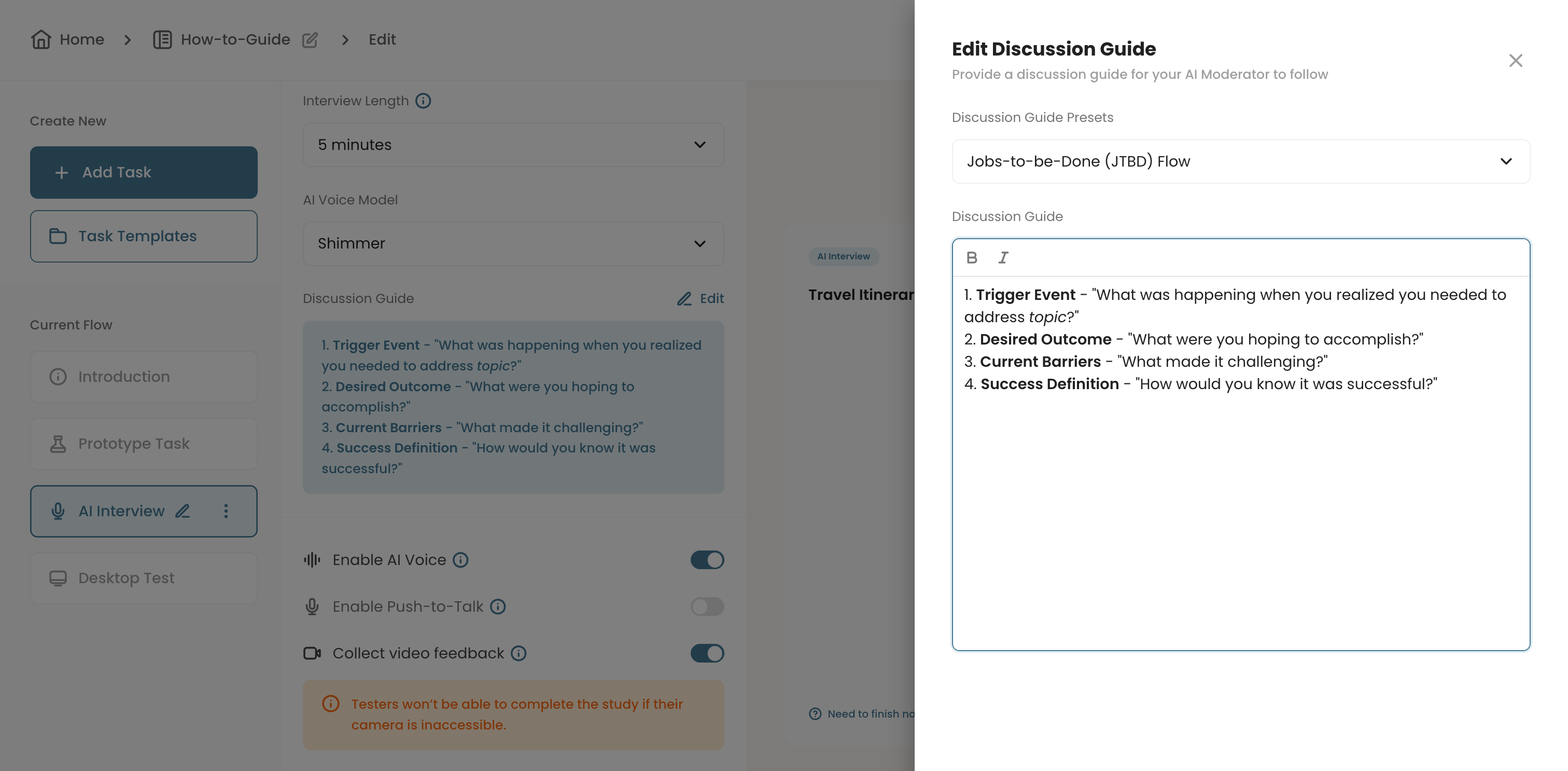
In Hubble, the Discussion Guide is designed to give researchers a direct way to communicate with the AI. Just as a human moderator follows an interview guide to steer the conversation, the discussion guide serves as a compact instruction set for the AI. It’s a blurb of text that tells the AI what you want to learn, how you want it to behave, and what tone or flow it should maintain. You can think of it as a mini prompt box that shapes how the AI facilitates the conversation.
While our model comes pre-guardrailed to ensure it always functions as a reliable interviewer, adding more specific context helps it go beyond surface-level questioning. The more details you include, about study objectives, participant types, or topics of interest, the better the AI can contextualize responses and ask nuanced follow-up questions that align with your goals.
A well-written guide serves three purposes.
- Helps the AI understand context: Who the participants are, what product or concept they are reacting to, and what kind of insights matter most.
- Sets the tone and flow of the conversation, from warm-up questions to reflective wrap-ups.
- Provides enough structure for the AI to stay focused while leaving room for organic dialogue.
When the guide is too vague, the AI might jump between high-level topics or fail to capture meaningful depths to derive insights. When it is overly prescriptive, the conversation can feel mechanical, limiting the depth of insight. The goal is to strike a balance between direction and flexibility, giving the AI enough freedom to explore while keeping it aligned with your research goals.
Writing an Effective Discussion Guide for AI Moderated User Interviews
Writing a discussion guide for AI moderation is part research design and part prompt engineering. The goal is to create instructions that help the AI agents stay aligned with your objectives while keeping the conversation natural and engaging for participants.
Below are key principles and practices to help you write a strong AI discussion guide for your next study.
1. Start with Clear Research Objectives
Every effective discussion guide begins with clarity. Before writing a single question, define what you want to learn from the study, or your research questions.
For example, are you trying to:
- Explore customers' mental model around key JTBD workflow?
- Uncover emotional drivers behind purchase decisions?
- Collect user feedback on a new product concept and value?
- Understand how customers compare the new feature against the existing one?
The more specific your objectives, the better the AI can align its probing behavior. Instead of saying, “Ask participants about the new pricing page,” try something like:
- “Ask participants how they perceive the new pricing page and what factors most influence their willingness to upgrade.”
This helps the AI understand not only the topic but also the type of insights you’re looking for: perception, motivation, or usability.
2. Provide Context
Unlike a human moderator, AI doesn’t infer background information unless you provide it. Including short contextual notes (if you attach images for the task) helps it understand the broader scenario.
For instance:
- “Participants will be shown an image of the home dashboard that summarizes recent activities, notifications, and data visualizations to understand their activities at a glance. We want to understand what stands out, and if each component makes sense.”
This simple addition enables the AI to tailor its interview questions to the right mental frame. It can then ask, “What was the first thing you noticed on the screen?” rather than something generic like, “What do you think about it?”
The more context you feed, the more grounded and relevant the AI’s follow-ups will be.
3. Structure the Flow
A well-structured flow keeps the conversation natural and logical.
Start with warm-up questions that build rapport and establish context:
“Tell me about how you typically sign up for a new app.”
Move into core questions that address your main objectives:
“What part of the onboarding felt most confusing or unnecessary?”
End with reflection prompts that encourage participants to think aloud about their experience:
“If you could change one thing about this process, what would it be?”
Labeling these sections in your discussion guide helps the AI maintain a smooth conversational rhythm. For example:
Warm-Up: “Start by asking about their current workflow.”
Core: “Dive into their reactions to the new dashboard.”
Reflection: “End by asking what could make the experience easier.”
4. Balance Specificity and Flexibility
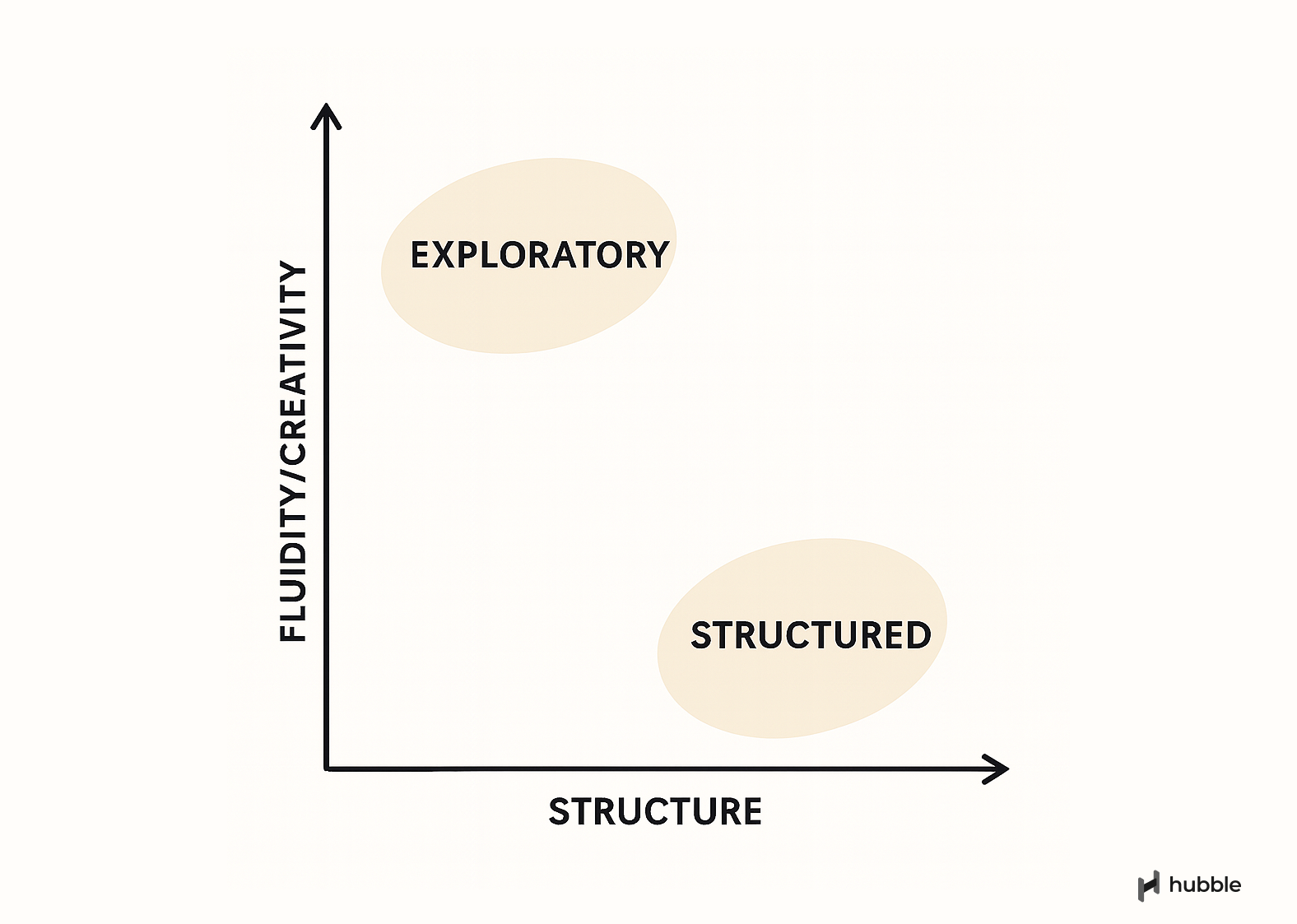
The level of detail you provide shapes how tightly or loosely the AI follows your guide.
- More detailed instructions give you precise control. Useful if you already have a specific set of questions to probe for.
- Looser, open-ended guides encourage exploration and reveal unexpected themes.
5. Define the Tone and Role
Tone matters. Tell the AI how to engage with participants and what kind of presence it should maintain.
Example instructions could be:
- “Encourage participants to elaborate on their thoughts.”
- “Maintain a neutral, professional tone suitable for enterprise users.”
These subtle cues ensure the AI stays consistent across sessions and feels aligned with your brand’s research voice.
How to Get Started with AI Moderation
Just like any new research method, the learning curve comes from experience: Observing how the AI handles your guide, how participants respond, and how insights surface afterward. Below are a few simple ways to get started quickly and confidently.
1. Try It Out Yourself
You’ll learn more from one real session than from reading a thousand words about how it works. Create a quick study in Hubble and let the AI lead a short five-minute conversation.
Start small. Choose a familiar topic, write a short discussion guide, and watch how the AI moderates. You will notice what it does well, where it follows your intent, and where it might need a clearer cue.
The first few runs will show you how powerful structure and tone can be. Once you see the AI in action, you’ll naturally start refining your guides to be sharper and more adaptive.
2. Use Pre-Made Presets as a Starting Point
If writing your first AI interview guide feels intimidating, you don’t have to start from scratch. Hubble includes pre-made discussion guide presets built for common research goals such as jobs-to-be-done (JTBD) studies, early exploratory discussion guides, or uncovering user pain points.
These presets already contain the right level of structure and tone to produce meaningful results, even without much customization. You can use them as templates to understand how AI moderation behaves, then gradually tweak the wording, flow, or tone to match your study’s intent.
3. Remember that AI has Limits
While AI moderation can simulate natural conversation, it’s still an AI. It doesn’t read facial expressions or subtle emotional cues the way a human moderator does. It relies entirely on what you communicate through the discussion guide.
It’s also designed to stay within ethical and conversational guardrails, so it won’t engage in off-topic or sensitive discussions beyond its scope. If your topic is complex or context-heavy, it’s often helpful to add clarifying notes or example follow-ups so the AI can better understand your intent.
In other words, treat it as a capable research assistant that performs best when you give it the right context. The more clearly you write your guide, the more intelligent and relevant the AI’s questions will be.
Designing Better Conversations with AI
AI moderation is influencing how researchers collect qualitative insights, giving teams the ability to run conversational studies at scale while minimizing the loss of depth. But the quality of those conversations still begins with you as the researcher. A clear, well-structured discussion guide tells the AI what matters, how to ask, and when to dig deeper. The more context, tone, and direction you provide, the more the AI can feel like a thoughtful partner rather than a scripted tool.
Getting started doesn’t have to feel daunting. Begin with a preset, run a short pilot, and see how your guide shapes the flow of conversation. Each iteration teaches you something new about how the AI interprets your intent. Over time, writing an AI interview guide becomes second nature, a mix of both research craftsmanship and prompt intuition.
FAQs


AI moderation refers to an automated approach to qualitative research where an AI acts as the interviewer or facilitator. Instead of a human moderator guiding the session, the AI leads a conversation with participants, asks adaptive follow-up questions, and collects insights in real time. In Hubble, AI moderation allows researchers to run conversational studies at scale while maintaining the depth of a human-led interview.
It depends on your goals. For exploratory studies, a looser guide allows the AI to ask broader, open-ended questions that uncover unexpected insights. For usability or task-based studies, a more structured guide keeps the AI focused on specific features or flows. The key is to provide enough direction for clarity, but not so much that the AI becomes overly rigid or repetitive.
The discussion guide tells the AI what to focus on, how to behave, and how the conversation should flow. Unlike a human moderator who can adjust tone or direction intuitively, the AI relies entirely on these written instructions. A well-crafted discussion guide ensures that the AI stays on-topic, asks relevant follow-ups, and maintains a consistent tone across all sessions.
Yes. Hubble offers pre-made discussion guide presets designed for common research scenarios like usability testing, concept feedback, and product discovery. These presets provide a strong starting point and can be customized with your own objectives, tone, and context. Starting with a preset is a quick way to learn how AI moderation behaves before refining your own guide.



.png)