The best UserTesting alternative depends on what your team needs to replace. Hubble is a strong option for teams that want AI-moderated interviews, human-led interviews, usability testing, participant recruitment, and participant management in one platform. Maze is a strong choice for rapid prototype testing, dscout for diary and longitudinal research, Lookback for collaborative moderated interviews, and Optimal Workshop for information architecture research.
UserTesting remains one of the broadest enterprise research platforms, with moderated and unmoderated testing, a global participant network, AI-assisted analysis, and advanced recruiting options. Teams usually evaluate alternatives when they want a different pricing model, a more specialized workflow, or a platform that better matches their research volume and methods.
Best UserTesting alternatives at a glance
Pricing below describes the stated billing basis, rather than the total cost of a research program. Recruitment, incentives, usage, and additional features may affect your final spend. Each platform's linked pricing page is the source for its pricing entry.
The use-case recommendations are our editorial assessment based on vendors' public product and pricing information reviewed in October 2026.
Why consider a UserTesting alternative?
UserTesting remains a comprehensive enterprise research platform, so the goal is not to find a tool that is universally “better.” The better question is which platform best fits your research program.
- Pricing model and scale. UserTesting's current plans include both test-based consumption and team-based unlimited options, but pricing is customized. Teams with smaller or more specialized programs may prefer a different buying model.
- Specialized workflows. Teams focused on AI-moderated interviews, diary research, information architecture, or continuous in-product feedback may get more value from a platform built around those workflows.
- Feature packaging. UserTesting's Advanced edition includes moderated Live Conversation, while capabilities such as card sorting and tree testing are listed under Ultimate. Compare the exact edition and add-ons you need.
- Participant strategy. UserTesting has expanded its recruiting capabilities, including Advanced Targeting powered by User Interviews for harder-to-reach B2B and niche audiences. Compare panel fit, self-recruitment, and participant management—not just headline panel size.
What to evaluate
UserTesting supports moderated Live Conversations (user interviews), unmoderated testing, a participant network, and AI-assisted analysis. Its current plans distinguish between test-based consumption and team-based unlimited usage. The Advanced edition includes moderated sessions and AI-generated summaries; Ultimate adds capabilities such as card sorting, tree testing, and custom audience management.
Based on what UserTesting offers, your decision can be more specific than whether another product has “AI” or “user testing.” You can assess the type of research that is supported and examine how different feature sets fit into the current research workflow:
- Research methods. List your recurring studies: usability tests, human-led interviews, AI-moderated interviews, surveys, or information architecture tests. Check whether each method is included in the proposed package.
- Participant access. Ask how you would reach your actual audience, including specialist B2B roles, existing customers, languages, and regions. A large headline panel size does not establish that your target segment is available.
- Total cost. Price the same study plan across vendors. Include platform access, recruitment, incentives, researcher seats, recording limits, and any add-ons.
- Analysis and evidence. Run a sample study through the full process. Can researchers check summaries against recordings and transcripts, correct interpretations, and share useful findings?
- Enterprise requirements. Ask for the security documentation, access controls, data handling terms, and retention settings your organization requires. Confirm which are included in your quote.
1. Hubble
Best for AI-powered mixed-method research in one platform. Hubble combines AI-moderated interviews, human-led interviews, prototype and live-site usability testing, in-product feedback, participant recruitment, and participant management. It is a strong fit for product and research teams that want to run both qualitative and quantitative research without stitching together separate interview, testing, recruitment, and analysis tools.
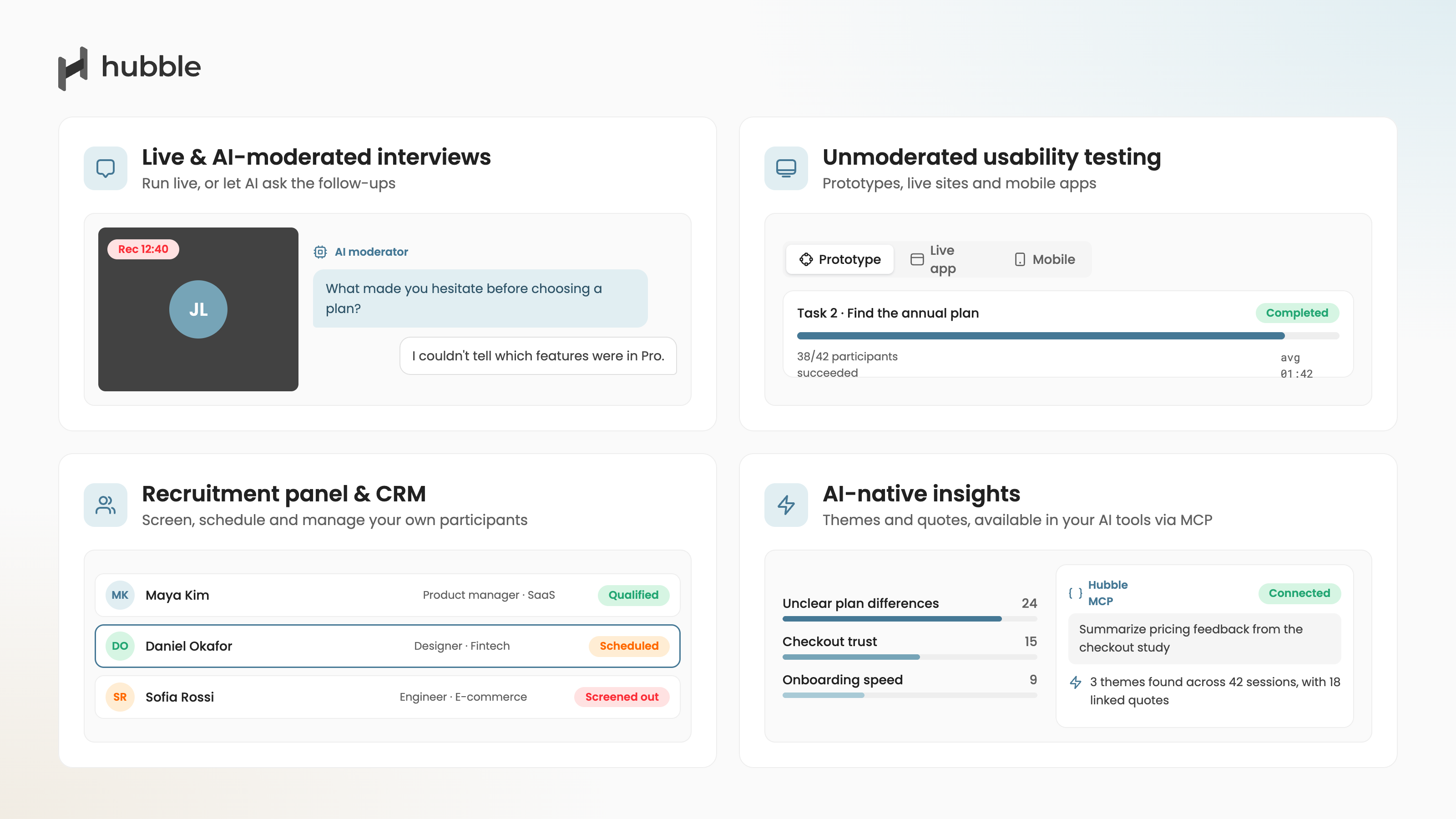
Hubble's latest AI-moderated interviews use a customizable discussion guide and capture voice and video responses. Researchers can review transcripts, summaries, and themes. Its AI moderator supports conversational follow-ups, while human-led interviews provide scheduling, recording, transcription, and analysis for live sessions.
For recruitment, Hubble connects teams with Respondent and User Interviews. Its participant CRM lets teams maintain their own participant pool, organize contacts, and invite relevant people to studies. This is useful when a research program needs both new prospects and existing customers.
Hubble also supports AI-native research workflows through its MCP server, which lets compatible AI assistants work with research evidence and supported study workflows.
Pros
AI-moderated and human-led interviews, unmoderated usability testing, external recruitment options, and an internal participant CRM in one research workflow.
Cons
The free plan is limited to one seat and 10 monthly responses. Moderated studies and access to SOC 2 Type II documentation appear under Enterprise on the public pricing page. Confirm AI interview allowances and recruitment costs in your quote.
Pricing
A free plan is available with usage limits, alongside custom Enterprise pricing. The free tier allows a single seat and 10 monthly responses for Free; Enterprise includes moderated studies and access to SOC 2 Type II documentation. See current pricing.
“I wanted it to be easy for the customers to reply to us and Hubble has done that…we can go wild and test multiple features at once without needing the engineers to implement the product."
Minhtri Chu Head of Product at Doorvest
Hubble vs UserTesting:
Both platforms support moderated and unmoderated research. Explore Hubble if your team wants AI-moderated interviews alongside human-led sessions and a CRM for inviting existing customers.
Choose Hubble when full AI-moderated interviews, in-product research, participant CRM, and AI/MCP workflows are priorities. Choose UserTesting when your program places more value on its large global participant network and mature enterprise deployment. UserTesting's Advanced plan includes moderated Live Conversation, while capabilities such as card sorting and tree testing are listed under Ultimate, so compare the exact package rather than assuming feature parity.
💡 Quick Tip
To learn more about Hubble vs. UserTesting side-by-side comparison, we recommend our article on Hubble vs. UserTesting .

Plan, launch studies, recruit, and analyze without having to stitch separate tools.
Request a Demo2. Maze
Maze combines prototype evaluation with methods including live website testing, surveys, moderated interviews, and AI-moderated interviews. Its platform also includes participant recruitment and automated reporting (Maze packages and capabilities).
.png)
Pros
Various research methods are supported with its own participant panel. Prototype testing sits alongside live website testing, surveys, participant recruitment, and interview options.
Cons
Maze's pricing page places capabilities such as AI Moderator, interview studies, and mobile testing under Enterprise. Check the package against your exact study methods.
Pricing
Free version is available with limitations. Reference Maze's current pricing and packages for a proposal matched to your methods and usage.
Maze vs. UserTesting
Both cover prototype evaluation and broader research. Maze is a candidate when your work starts with design validation and you want to extend it into other methods; UserTesting's Advanced edition already includes moderated and unmoderated sessions. Compare the specific methods and participant access in the packages you would buy, since Maze places several advanced capabilities under Enterprise.
3. Userlytics
Userlytics supports testing websites, apps, and prototypes, with participant recordings, recruitment, and AI-assisted analysis. It also offers information architecture methods including card sorting and tree testing. (Userlytics features and plans).

Pros
Moderated and unmoderated testing across websites, apps, and prototypes, with several ways to purchase studies. Offers integrations with design tools, such as Figma, Adobe XD, and InVision.
Cons
Project-based purchasing has a five-session minimum. Public price references vary by plan and session type. Some public reviews mention an interface that can feel dated, so it is worth evaluating the end-to-end researcher and participant experience in a pilot. Request a quote for your mix of panel and self-recruited participants for details.
Pricing
Project-based purchases, annual plans, self-recruitment subscriptions, and a custom Limitless option are listed. Project-based purchasing has a five-session minimum. You can review current plans for Userlytics.
Userlytics vs. UserTesting
These are closer substitutes for teams running recorded usability studies with recruited or self-supplied participants. Userlytics offers project-based purchasing as well as ongoing plans.
On the other hand, UserTesting offers test-based and team-based consumption models. You would want to request comparable quotes using the same session count, moderation needs, and participant mix for eye-level comparison.
4. Lyssna
Lyssna offers prototype, first-click, five-second, preference, card sorting, and tree tests, as well as surveys and interview workflows. Its current capabilities include live website testing and audio, screen, and camera recordings for unmoderated tests. (Lyssna pricing and feature comparison).

Pros
Flexible suite of research methods: Prototype, first-click, five-second, preference, card sort, and tree tests are available alongside recordings and live website testing.
Cons
Panel responses are priced separately on all plans. Growth limits in-depth studies to only five per month. You should compare study limits and recording access with your usage.
Pricing
Flexible pricing with Free, Growth, and Enterprise plans are available. Responses from Lyssna's participant panel are priced separately on all plans. See current pricing.
Lyssna vs. UserTesting
Consider Lyssna when your regular questions concern first impressions, design preference, navigation, or prototype flows. UserTesting also supports research beyond observed task sessions, with card sorting and tree testing listed under Ultimate, which is a higher price tier. Compare plan access to your most-used methods and include Lyssna's separate panel charges in the estimate.
5. UXTweak
UXtweak combines website, mobile app, and prototype testing with card sorting, tree testing, surveys, and live interview options. It also offers panel recruitment and tools for managing your own participant database. (UXtweak plans).

Pros
Card sorting and tree testing complement website, app, and prototype studies. Teams can use a panel or manage their own participant database. It provides various research methods from moderated to unmoderated, including IA testing and 5 seconds, and more.
Cons
The free plan limits responses and results access. Live interviews, panel participants, and certain analysis features are add-ons to Business. You'll need to double check the full cost and concurrent study allowance.
Pricing
Free, Business, and Custom plans are listed. Check the live configuration or request a quote for the required add-ons. See current pricing.
UXtweak vs. UserTesting
UXtweak is worth comparing if card sorts, tree tests, and website usability studies frequently appear in the same research program. UserTesting lists card sorting and tree testing under Ultimate, so check the cost of the editions you would actually use. In UXtweak, include interview and panel add-ons where needed.
6. Lookback
Lookback supports moderated and unmoderated sessions, recordings, transcripts, and collaborative analysis. Its observation features include private stakeholder chat, and recruitment is powered by User Interviews. It also describes AI-assisted discovery and follow-up questions. (Lookback features).

Pros
Moderated and unmoderated sessions, recordings, transcripts, and private stakeholder observation support collaborative qualitative research.
Cons
Lack of free plan and reviews suggest unstable connection problems. Session and recruited participant allowances are separate. Included recruitment allocations cover recruitment fees, not participant incentives.
Pricing
Freelance starts at $299 per year for 10 sessions. Team, Insights Hub, and custom Enterprise plans provide larger allowances. See current pricing.
Lookback vs. UserTesting:
Both support moderated and unmoderated sessions. If stakeholder observation and discussion during live sessions are important, try the same interview in each platform and compare the observer experience and analysis workflow.
Then account for Lookback's separate session, recruitment, and incentive costs against the UserTesting proposal.
7. dscout
Dscout's diary studies support repeated activities with photo, video, and screen-recording responses, alongside reminders and participant progress management. Its wider research offering includes interviews and usability testing. Sources: diary studies and platform plans.

Pros
Multi-part diary studies with reminders, progress tracking, and photo, video, or screen-recording responses support research over days or weeks.
Cons
Public pricing is customized. Scope methods, seats, recruitment, incentives, and support services before comparing its cost with another platform.
Pricing
Dscout offers customized Core, Select, and Enterprise subscriptions with exact quote available upon request. See pricing considerations.
dscout vs. UserTesting:
Choose the comparison around your research question. For an experience that unfolds across days or weeks, Dscout's diary workflow is a reason to evaluate it.
For a defined website or prototype task, compare both platforms' usability workflows. Price the intended study length, participant activities, and support rather than matching platform fees alone.
8. Userbrain
Userbrain collects screen-and-audio recordings from people completing tasks on websites, apps, and prototypes. It supports panel recruitment, your own participants, transcripts, clips, and AI-assisted insights. (Userbrain plans and features).

Pros
Monthly plans include panel testers, screen-and-audio recordings, and tools for transcripts, clips, and AI-assisted analysis.
Cons
Starter allows only one test setup and three panel testers per month. Unused monthly participant allowances expire at the end of the billing cycle.
Pricing
Starter is $49 per month and Plus is $249 per month, billed monthly. Annual Flex and Enterprise options are also available. See current pricing.
Userbrain vs. UserTesting:
If you need a small, predictable cadence of think-aloud usability sessions, Userbrain's included monthly participant allowances make the cost straightforward to model.
UserTesting covers a wider set of moderated and unmoderated workflows. Compare the number of tests, sessions, and participants you need in an actual month, including what happens to unused allowances.
9. Userfeel
Userfeel supports moderated and unmoderated testing, surveys, and panel recruitment. Higher plans add methods such as tree testing and card sorting, along with AI analysis. (Userfeel plan comparison)

Pros
Credit pricing covers moderated and unmoderated studies, with published usage rules for different session lengths and participant sources with the pay-as-you-go model.
Cons
Credit consumption varies by session length and participant source. Methods such as card sorting and tree testing, and AI analysis, require higher tiers.
Pricing
A limited free account supports your own participants. Solo is listed at $3,000 per year for 50 credits, with larger Team, Enterprise, and Custom options. See current pricing.
Userfeel vs. UserTesting
Userfeel's credit system can suit teams that can forecast a mix of session lengths and participant sources. UserTesting offers test-based consumption and team-based unlimited usage within a defined scope. You would have to model the same annual study calendar in credits and in a UserTesting quote, including moderation, recruiting, and incentives.
10. Optimal Workshop
Optimal, at optimalworkshop.com, offers card sorting, tree testing, first-click testing, surveys, prototype testing, and live site testing. Its current platform also includes recordings and AI-assisted analysis. (Optimal plans and methods)
.png)
Pros
Card sorting, tree testing, and first-click testing suit navigation and content research; the platform also supports other usability methods.
Cons
Starter includes only five studies per year despite unlimited seats and participant responses per study. Additional study bundles add to the cost.
Pricing
Starter is $199 per month, billed annually; Enterprise uses custom pricing. See current pricing.
Optimal vs. UserTesting
If discoverability and navigation are your central questions, compare Optimal's card sorting and tree testing workflow with UserTesting Ultimate, where those methods are listed. Optimal's Starter includes all study types but only five studies per year. The number of studies you plan to run matters as much as the monthly rate.
11. Sprig
Sprig describes its platform around designing studies, reaching respondents, and synthesizing results. Its channels include external panels, email, and in-product deployment, with adaptive surveys and AI-supported study design and analysis. (Sprig pricing and platform scope)

Pros
Adaptive surveys can reach respondents through in-product, email, and panel channels, with AI support for study design and synthesis.
Cons
Its public offering is centered on surveys. If observed usability sessions or live interviews are essential, you would have to confirm those workflows before treating it as a complete substitute.
Pricing
Enterprise pricing depends on response volume, activated capabilities, and deployment environments. See current pricing.
Sprig vs. UserTesting
Sprig is a stronger candidate when the ongoing job is collecting survey feedback from customers across product, email, and panel channels.
UserTesting centers its offering on observing people complete tests and talking with them. Decide whether your team needs a continuous feedback program, recruited sessions, or both before treating the two as direct substitutes.
12. Loop11
Loop11 supports moderated and unmoderated tests, prototype testing, and benchmarking. Its reporting options include recordings, usability metrics, and, depending on plan, heatmaps and clickstream analysis. (Loop11 plans and features)

Pros
Moderated and unmoderated task testing, prototype evaluation, and benchmarking are supported, with usage metrics and recordings.
Cons
Rapid Insights allows three projects per month and 10 participants per project. Recruitment, consulting, and moderator services are outside the listed plans.
Pricing
Rapid Insights is $199 per month when billed monthly, or $179 per month billed annually. Pro and custom Enterprise plans expand capacity and features. See current pricing.
Loop11 vs. UserTesting
Loop11 is relevant when your team wants to repeat task-based studies and compare usability over time.
Both platforms support moderated and unmoderated testing, but Loop11's listed plans exclude recruitment services. Include participant sourcing and any moderator service in a like-for-like cost comparison with UserTesting.
13. ContentSquare and Hotjar
Hotjar is now part of Contentsquare, whose offering includes heatmaps, session replay, surveys, funnels, and other analytics capabilities. (Hotjar and Contentsquare)

Pros
Heatmaps, replay, surveys, and funnels help teams investigate behavior on a live website with advanced visualization.
Cons
Behavioral analytics does not itself provide the same recruited, task-based study workflow as UserTesting. Assess it for the specific questions your team needs to answer.
Pricing
Free, Growth, Pro, and Enterprise plans are available. See current Contentsquare pricing.
Contentsquare and Hotjar vs. UserTesting
Contentsquare helps you inspect what visitors do on a live site through replay, heatmaps, and analytics. UserTesting helps you recruit a defined audience and observe responses to specific research tasks. The tools address different evidence needs; compare them only if your goal is to replace a particular feedback workflow, and consider using both where appropriate.
How to choose your shortlist
Build a shortlist around one real upcoming study. Give each vendor the same audience definition, study design, participant count, and expected output. Ask for a demonstration and a cost estimate using those requirements.
- For a broader platform comparison, start with Hubble, Maze, Userlytics, Lyssna, or UXtweak.
- For a diary project, include Dscout. For live stakeholder observation, evaluate Lookback.
- If navigation is your main question, include Optimal.
- For a smaller recurring usability program, compare Userbrain, Userfeel, and Loop11. If your priority is ongoing feedback or behavioral analytics, evaluate Sprig and Contentsquare against those specific needs.
These are starting points, not exclusive categories. Use a pilot to assess participant fit, study setup, data quality, and the effort required to produce findings your stakeholders can use.
Which UserTesting alternative should you choose?
There is no single best replacement for every team. Start with the research method you run most often, the participants you need to reach, and the way you want to pay for research.
- Choose Hubble if you want AI-moderated and human-led interviews, usability testing, recruitment, participant management, in-product research, and AI-native workflows in one platform.
- Choose Maze if rapid prototype and design testing is the center of your workflow.
- Choose Userlytics if you want a traditional remote usability-testing alternative with moderated and unmoderated options.
- Choose dscout for diary and longitudinal qualitative research, Lookback for collaborative moderated sessions, and Optimal Workshop for information architecture research.
Whichever tools make your shortlist, run the same pilot study in each one and compare participant fit, setup time, analysis quality, collaboration, and total cost. If you are evaluating Hubble specifically, see our Hubble vs. UserTesting comparison or request a demo.
Plan, launch studies, recruit, and analyze without having to stitch separate tools.
Request a DemoAdditional Resources
If you are interested in further exploring various tools available in the market, we recommend some of the articles below:
- To learn more about top UX research tools, please see the best user research tools.
- To see our curated list of survey tools, see the best survey tools for research.
- To learn more about UX research agencies, see the top UX research firms in the US and the best alternatives.
- To learn more about AI-powered tools for user research, we recommend the top 11 AI tools for user research.
FAQs


The best UserTesting alternative depends on your primary use case. Hubble is a strong choice for AI-moderated interviews and mixed-method research; Maze for rapid prototype testing; Userlytics for traditional remote usability testing; dscout for diary and longitudinal research; Lookback for moderated interviews; and Optimal Workshop for information architecture research.
Other options in this guide include Lyssna, UXtweak, Userbrain, Userfeel, Sprig, Loop11, and Contentsquare/Hotjar.
Both Hubble and UserTesting support moderated and unmoderated research, but they emphasize different workflows. Hubble combines full AI-moderated interviews, usability testing, in-product research, participant recruitment, participant CRM, and MCP-based AI workflows in one platform.
UserTesting offers a large global participant network, mature enterprise deployment, moderated Live Conversation, AI-assisted analysis, and expanded B2B recruiting through User Interviews. UserTesting's Advanced and Ultimate editions package capabilities differently, so compare the exact plan against the methods your team needs.
UserTesting does not publish standard list prices. Its current plans use customized pricing with test-based consumption and team-based unlimited options. Your total cost depends on the edition, research volume, participant recruitment, and any add-ons.
When comparing alternatives, ask each vendor to price the same study volume, participant mix, seat count, and research methods so you are comparing total program cost rather than headline subscription price.
Compare five things: the research methods you run most often, access to the participants you need, total program cost, the quality and traceability of analysis, and enterprise requirements such as security, permissions, integrations, and data handling.
The best evaluation is a real pilot. Give each vendor the same audience, study design, participant count, and expected output, then compare setup time, participant fit, analysis quality, collaboration, and cost.


.png)