AI has quickly become part of the UX research conversation. New AI tools promise faster insights, automated analysis, and the ability to conduct research at a scale that once required dedicated researchers embedded on product teams. For UX researchers who have been practicing for a while, this shift can feel both promising and uncomfortable.
That discomfort is understandable. UX research is not a mechanical process. It is human work that depends on context, empathy, and interpretation. Beyond analyzing what participants say, researchers observe behaviors and pick up on subtle cues that shape how insights are formed.
The point is not whether AI will replace researchers, but how researchers can use AI to streamline their workflows in a rapidly changing landscape. When used intentionally and with clear guardrails, AI can act as a force multiplier across the UX research process. Used well, it creates more space for higher-value work, such as framing better questions, making sense of nuance, and aligning more closely with product teams.
This article takes a practical look at how AI can be applied across the UX research process, from planning and study design to facilitation and data analysis. Rather than focusing on research tools or AI features, we examine how AI can support researchers' jobs-to-be-done across real, end-to-end workflows.


Framing the UX Research Process
Before discussing where AI can support UX research, it is important to ground the conversation in the process itself. While teams may use different approaches, terminology, or workflows, most UX research involves the following end-to-end flow to some degree:
- Planning the research study
- Recruiting and screening participants
- Conducting research
- Analyzing data and synthesizing insights

Anchoring AI usage to specific phases of the UX research allows us to be more intentional about where automation adds value, where it is still a better trade-off to invest manual effort, and where a combination of both leads to better outcomes.
We frame AI usage around researchers’ jobs-to-be-done and desired outcomes at each stage, rather than evaluating AI tools or features in isolation without considering how they fit into existing workflows.
The sections that follow walk through each phase of the UX research process and explore practical ways AI can be used to support the work, along with key considerations and trade-offs to keep in mind.
1. Planning the Research Study
Planning and drafting are often where research feels the most ambiguous. Inputs are loosely defined, stakeholder expectations may be misaligned, and the problem space can still be taking shape. On top of that, researchers are often faced with a blank document and the pressure to quickly turn uncertainty into something actionable. This is one of the phases where AI can be most immediately useful.
Drafting an initial research plan
One of the most immediate ways AI can help at this stage is by kickstarting the first drafting process. The goal is not for AI to create a production-ready research plan. Instead, it helps you get oriented quickly and move past the initial hurdle of having to draft everything from zero.
In addition to reusing previous or existing work and resources, you can leverage generative AI to create an initial structure that serves as scaffolding. At this stage, AI is commonly used to:
- Generate outline of a study plan based on stated objectives and constraints
- Draft and refine initial research questions
- Produce early versions of interview guides or discussion prompts
Example Prompt
When using AI for drafting, clarity matters. Without guidance, AI can generate verbose, but generic plan that appear polished but lack context. Providing clear instructions and constraints helps keep the output grounded and relevant.
For a practical prompt, we like to include: role and context, instructions, and output (nice addition would be any input of past work or similar work to reference). For example:
Ideation for Question Phrasing
By conversing with AI and providing study scope, constraints, and context, you can explore different ways to structure a research project, challenge assumptions, or identify areas where rigor could be improved. This back-and-forth is especially useful during early ideation, when you want to diverge, pressure-test ideas, or ensure they are not overlooking important cases. At this stage, AI is commonly used to:
- Bounce ideas to check for missed edge cases or alternative perspectives
- Explore different research methods and compare possible approaches
- Generate and prioritize a short list of key questions aligned to a research objective
- Produce alternative question phrasing and follow-up probes
Guidelines for Using AI During Ideation
When using AI to generate questions or ideas, providing clear guardrails helps keep the output grounded and useful. This includes setting expectations around research quality, such as avoiding leading questions or overly broad prompts, and keeping the focus aligned with the research goals.
Example prompt:
* You can also refer to best generic guidelines for prompt engineering from OpenAI.
Desk Research and Early Exploration
UX researchers rarely begin by jumping straight into primary research. Instead, they start with desk research to understand what is already known, what remains unclear, and where the real knowledge gaps lie. Research efforts should not be spent answering questions that can be resolved through existing literature, prior studies, or publicly available information.
AI can support this stage by helping you scan and summarize existing information, surface relevant articles or studies, and organize background knowledge more efficiently.
Things to Watch Out For
Generative AI models are not designed to reliably surface the most current or authoritative information. They may also hallucinate sources or present outdated findings with confidence.
- Avoid relying on generative models for up-to-date or time-sensitive information
- Use AI-powered search tools when looking for recent, credible information
- Ask for sources or citations and review them carefully
- Treat AI output as a starting point, not a source of truth
Large language models are not guaranteed to reflect the latest research, emerging trends, or organization-specific context. Any information surfaced through AI should be validated through trusted sources before it informs research direction or decisions.
2. Recruiting and Screening Participants
Recruitment is one of the most operationally intensive parts of the research process. In larger organizations, dedicated Res Operations teams often manage this work. In smaller teams, however, it frequently falls on researchers themselves. It is also one of the areas that could be easily overlooked or rushed, in which quality issues can quietly undermine an entire study.
While AI cannot replace the logistical effort involved with scheduling, it can support earlier decisions, particularly when defining a clear and precise customer profile.
From a researcher's perspective, this phase is about ensuring the best quality participants with the right characteristics are selected.
Defining Participant Criteria
Before recruitment begins, researchers need to clearly define who should and should not participate. AI can support this job by:
- Clarify behavioral criteria
- Refine segment definitions
- Explore potential edge cases that might otherwise be overlooked
For example, when defining a target segment, AI can help translate broad descriptions into more concrete behavioral qualifiers. This makes screening logic sharper and reduces ambiguity when working with Res Ops and internal stakeholders.
Refining Screeners
Once participant criteria are defined, the next job is translating those characteristics into effective screening questions. Screeners directly influence study quality as they should ideally filter accurately without introducing bias or signaling the “correct” response. AI can support this step by:
- Generating screening question variations along with qualification criteria
- Expanding vague questions into more behaviorally specific ones
- Improving question phrasing and generating multiple choice options
For example, instead of asking, “Are you a current customer of Expedia?”, you can help refine the question to something more behaviorally grounded, such as, “When was the last time you used Expedia to book activities?”
How AI is Changing Recruitment
Recruitment is especially vulnerable to over-automation. For high-stakes studies, manually reviewing participant information is still necessary to ensure the strongest possible fit. Over-reliance on automated filtering can introduce subtle quality issues.
At the same time, participants are increasingly using AI to optimize their screener responses. This makes it harder to distinguish genuinely qualified participants from those who simply understand how to “game” the screener.
Participants are increasingly using AI across three key categories: screener optimization, presenting “professionally”, and pattern matching.
From the article
While many user research tools offer features such as automatic invitations for qualifying participants, copy-paste detection for open-text responses, or metrics like time-to-complete, it still requires UX professionals to carefully review the responses as the margin for error is small especially for user interviews where each session matters.
3. Conducting Research
Unlike earlier phases, this is where researchers are directly interacting with customers and observing user behavior. The work becomes relational and interpretive. AI can support certain operational aspects of this phase, but the core human elements of facilitation, interaction, and observation remain central.
Transcription and Notetaking
One of the primary jobs during data collection is ensuring that conversations and observations are accurately captured and organized.
AI-powered transcription has significantly improved in accuracy and flexibility. It reduces the manual burden of transcribing every research session. Beyond transcription, AI can:
- Generate structured summaries of conversations
- Assist with real-time or post-session note-taking based on textual data
- Tag or label specific moments within a transcript for you to revisit later
This is particularly helpful when research is heavily text-based, such as interviews or moderated discussions.
AI Moderation
AI moderation is one of the latest debated developments in UX research. The core job it attempts to support is scaling qualitative data collection without requiring a live moderator.
The way it works is it will follow a provided script, or come up with its own, and is flexible enough to ask follow-up questions. You can additionally provide additional prompting to guardrail the conversation like feeding in the discussion guide.
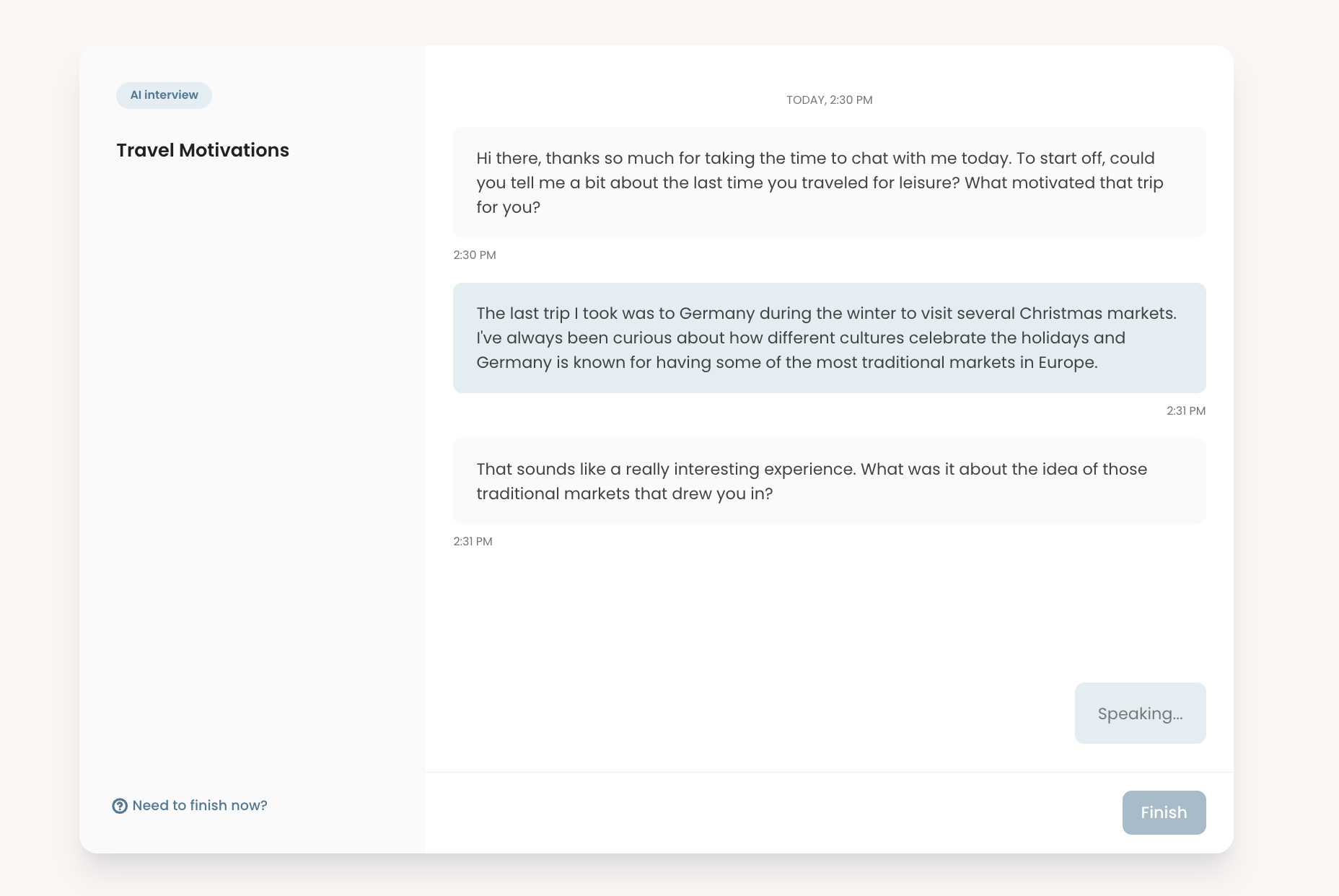
In text-based conversational, attitudinal research, AI interview can:
- Ask structured follow-up questions
- Maintain conversational flow without going off-topic
- Conduct interviews in other languages
This can expand reach and reduce scheduling constraints. However, AI moderation is fundamentally limited by the data it receives. For user testing that depends on observing behavior, especially usability testing, human moderation remains crucial.
Limitations of AI When Running Research
AI can make data collection feel faster and more scalable. The risk is assuming that structured transcripts or AI-led conversations are equivalent to deeply observed research. Text alone does not capture the full richness of human behavior.
AI-generated notes should also be approached with caution. Because they are derived primarily from textual input, they reflect what was said, not necessarily what was experienced. In usability testing or behavior-based studies, AI cannot interpret non-verbal signals such as hesitation, facial expressions, body language, or subtle physical interactions with an artifact.
4. Data Analysis and Insights
This phase is where researchers move from raw transcripts, recordings, and responses to structured insights that inform decisions.
Sanitizing and Preparing Data for Analysis
Before meaningful analysis begins, you often need to clean and prepare data. This is especially true for survey studies with large response volumes, where incomplete answers, inconsistent entries, or low-quality responses can distort research findings.
Data cleaning has traditionally been one of the most manual and time-consuming parts of any data analysis process. You may need to filter incomplete submissions, remove duplicates, standardize formats, or identify suspicious patterns.
AI-enabled spreadsheet and analysis tools now help streamline this work by:
- Flagging inconsistent or anomalous responses
- Standardizing open-text formatting
- Identifying missing or incomplete data
This reduces manual sorting time, but requires need some manual work especially in high-stakes research.
Transcripts and AI Summaries
AI-powered transcription has become significantly more accurate and accessible. UX teams no longer need a second person capturing verbatim quotes during sessions in most cases. This shifts effort away from documentation and toward active listening.
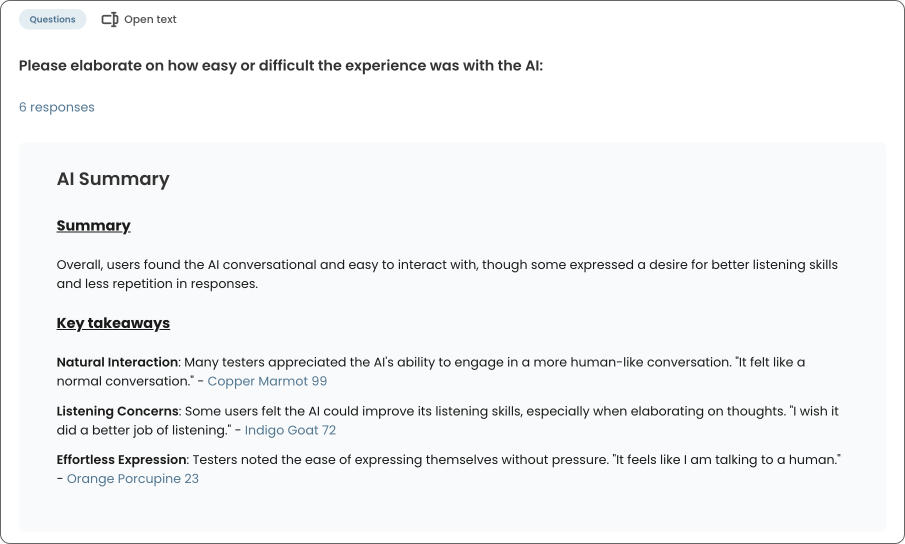
Beyond transcription, AI can generate structured summaries directly from transcripts. These summaries can:
- Highlight overall themes and takeaways
- Supported with relevant quotes
- Summarize the content of the video and key moments
Summaries should be treated as working drafts as they are based on textual data without any nuance and interactions that participants have during the actual research sessions.
First Pass Analysis and Clustering
One of the most common uses of AI in this phase is feeding raw qualitative data into a model to generate an initial sense-making pass to group similar user feedback and cluster recurring ideas for early thematic analysis. This first-pass clustering is valuable because it can:
- Surface patterns across large datasets
- Save time from manually sorting notes
- Provides a starting structure
Safeguarding Insight Quality During Data Analysis
One of the most important parts of analysis is not just organizing findings, but internalizing the data. Reviewing transcripts hands on, rewatching interview recordings, and capturing key moments help you develop familiarity with the material. Over time, you should be able to reference specific participants, quotes, or moments without constantly returning to the source.
Relying too heavily on AI during this stage can weaken that internalization. When summaries and clusters replace direct engagement with the raw data, you risk becoming detached from the nuance that gives actionable insights.
AI-generated clusters and summaries should always be treated as first-pass interpretations. A human expert review is essential. Automated grouping may reflect surface-level similarity, but it does not replace interpretive reasoning.
Examples of Interpreting Behavioral Data
If 7 out of 10 participants say they did not find a new feature useful, AI can flag that pattern with generic assumptions with text based data.
- You should still do the interpretive work: What expectations did participants bring? At what moment did friction occur? Was the issue discoverability, clarity, perceived value, or something else?
Summaries can also strip away contextual detail, especially in usability studies. If participants fail at different stages of a task, AI may identify a general theme of “difficulty,” but it may not clearly distinguish which interaction point caused confusion or breakdown. Observing where friction occurred and how participants recovered remains a fundamentally human task.
Getting Started with AI in UX Research
Artificial Intelligence is evolving quickly, and the surrounding landscape is shifting just as fast. In this article, we’ve walked through four major stages of the user research, but in practice, it extends beyond, including stakeholder alignment, reports and knowledge sharing, research repository, and cross-functional collaboration. With so many moving parts, it is easy to feel overwhelmed about where to begin.
The most effective way to start is not by adopting a new tool. Rather, you can begin by building comfort through practice.
Start by Improving Your Prompting Through Real Work
One of the simplest and most impactful steps is to actively leverage AI in your day-to-day research tasks and refine how you communicate with it. The quality of output is often directly related to the clarity of context, constraints, and intent you provide.
In many ways, working with AI is iterative. The more context you provide and the more you refine your prompts, the more tailored and relevant the responses become. It is less about finding the perfect prompt and more about building a feedback loop between you and the model, treating it like an AI-assistant.
Focus on Jobs, Not AI Features
Rather than asking “Which AI tool should I use?”, start by going through your workflow and pain points: "which part of my research practice feels most time-consuming or repetitive?” That is usually the best entry point.
You can anchor experimentation to specific jobs whether it's drafting a research plan, organizing large datasets, or summarizing key findings.
Build Guardrails Early
As you integrate AI into your workflow, establish personal or team-level guardrails across your prompt engineering approach, such as:
- Always review AI-generated outputs manually
- Validate sources during desk research
- Cross-check with other team members during data analysis
- Maintain documentation of how AI-supported insights were derived
FAQs


The most effective way to start is by applying AI to a specific research job that feels time-consuming or cognitively heavy. Instead of adopting a AI UX research tool broadly, begin with a single task such as drafting research plans, refining screeners, summarizing transcripts, or conducting initial clustering. Start small, review outputs critically, and build from there.
Common risks include over-reliance on surface-level patterns, loss of contextual nuance, hallucinated sources during desk research, and accepting polished summaries without verification. AI should be treated as an accelerator for research tasks, not a substitute for critical thinking or methodological rigor.
AI can facilitate text-based conversations and generate follow-up questions, but it cannot reliably observe non-verbal behavior, hesitation, body language, or real-time interaction with an interface. For usability testing that depends on observing behavior and friction points, human moderation and review remain essential.
AI is particularly useful for the initial analysis of qualitative data. It can cluster similar responses, identify recurring themes, summarize transcripts, and surface patterns across large datasets. However, you should validate themes against raw data and ensure that interpretation, prioritization, and strategic framing remain human-led.



.png)